8 Header Styles Compared: Sticky, Transparent, Glass, and When Each One Hurts LCP
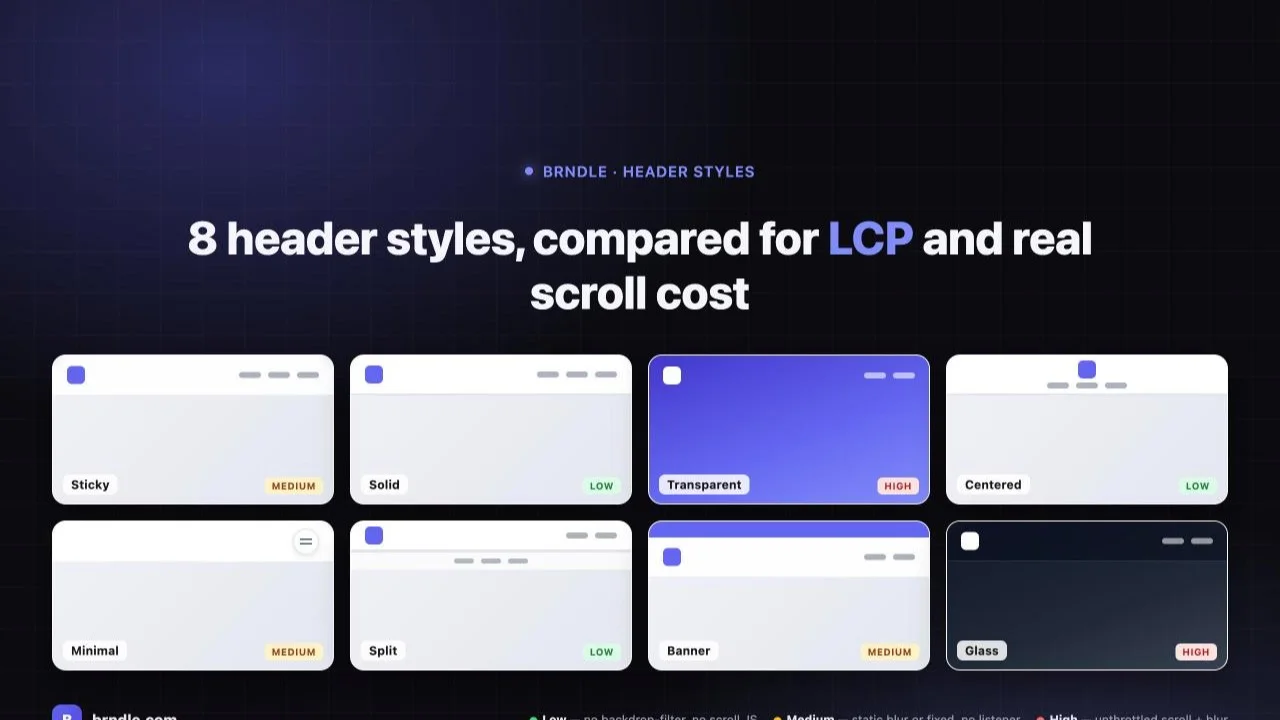
Picking a header style usually gets treated as a five-minute decision at the end of a build: scroll the dropdown, click the one that looks closest to the client’s mood board, move on to the footer. That’s a mistake for any theme that ships a Lighthouse-100 baseline as a selling point, because a header isn’t a static image, it’s a position value, a stacking context, and in half of Brndle’s eight built-in styles, a backdrop-filter running on every scroll frame for the entire session. Those are real CSS mechanics with real rendering costs, and they don’t show up in a screenshot comparison.
This post reads Brndle’s own source, resources/views/sections/header.blade.php and the settings schema in app/Settings/Defaults.php, and walks through exactly what each of the eight shipped header styles does to the browser: which ones sit in normal document flow and cost nothing extra, which ones take over a compositing layer with position: fixed, and which ones run an unthrottled scroll listener that mutates inline styles on every tick. Then it gets to the part that actually matters for a theme that claims Lighthouse 100 by default: when a header style’s own mechanics can quietly work against your Largest Contentful Paint, and what to do about it without giving up the look you picked it for.
In this comparison
- Why header style is a rendering decision, not just a look
- The real 8 header styles in Brndle’s source
- Grouping the 8 by actual performance cost: low, medium, high
- The LCP-specific gap none of the 8 styles close by themselves
- Decision guide: which style for which site
- Questions about Brndle’s header styles and performance
- What should you do next?
Why header style is a rendering decision, not just a look
Every header style in Brndle ultimately resolves to the same handful of CSS and JS primitives, and which ones a given style reaches for is exactly what separates “basically free” from “worth a second look.” Three things do the actual damage, or don’t:
- Positioning scheme.
position: relative(in document flow) costs nothing beyond its own box.position: stickyandposition: fixedboth promote the header to its own compositing layer, which is cheap on its own but becomes the precondition for everything below. - backdrop-filter. A blurred, translucent header needs to sample and blur everything behind it, every frame it’s visible, for as long as it’s on screen. That’s a GPU-composited effect, not a one-time paint, and it’s the single most expensive thing any of these eight styles does.
- Scroll listeners. A header that changes appearance as you scroll needs a
scrollevent handler. Whether that handler is cheap or expensive depends entirely on whether it’s throttled to the browser’s paint cycle (requestAnimationFrame) or left to fire on every raw scroll event, which on a trackpad or a fast swipe can be dozens of times per frame.
None of this is theoretical. We pulled it directly from the Blade templates and the settings registration in the theme’s own GitHub repository, and we’re citing the actual class names and listener code below so you can verify it against header.blade.php yourself rather than take our word for it.
The real 8 header styles in Brndle’s source
Brndle’s settings schema (app/Settings/Defaults.php) registers the option plainly: 'header_style' => ['section' => 'header', 'label' => 'Header style', 'description' => '8 layouts; pick the closest match for the brand.', 'control' => 'select'], with a sanitize allowlist in PageMetaServiceProvider confirming the exact set: sticky, solid, transparent, centered, minimal, split, banner, glass. That’s the canonical list, in the order the admin dropdown presents them, and it’s also a per-post override, not just a sitewide setting, via the _brndle_header_style post meta key, which means a single site can mix styles across its landing pages without touching the global default.
1. Sticky (the default)
Markup: <header class="sticky top-0 z-50 bg-surface-primary/80 backdrop-blur-xl border-b">. This is position: sticky, which keeps the header pinned once it reaches the top of the viewport without removing it from document flow the way fixed does, and it runs backdrop-blur-xl unconditionally from first paint. There’s no scroll listener attached to the style itself, the glass look is baked into the header’s own class list and stays constant whether you’re at the top of the page or scrolled to the bottom. The cost is a permanent GPU-composited blur layer for as long as the header is in the viewport, but it’s a flat, unchanging cost, nothing recalculates on scroll.
2. Solid
Markup: <header class="relative z-50 bg-surface-primary border-b-2">. No sticky, no fixed, no backdrop-filter, no scroll listener anywhere in this branch of the template. It sits in normal document flow like any other block-level element, scrolls away with the rest of the page, and the only thing distinguishing it visually from a plain <div> is a solid background color and a 2px border. This is the cheapest of the eight styles by a wide margin, there’s nothing here for the browser to do beyond a standard paint.
3. Transparent
Markup starts as <header class="fixed top-0 inset-x-0 bg-transparent transition-all">, meaning it’s pulled out of document flow immediately (so the page needs its own top padding to avoid content sliding under it) and begins fully see-through over whatever hero sits behind it. A plain window.addEventListener('scroll'...) handler then toggles five classes, bg-surface-primary/80, backdrop-blur-xl, shadow-sm, border-b, and a border-color utility, once window.scrollY > 50. The listener is marked { passive: true }, which is good practice (it tells the browser the handler won’t call preventDefault(), so scrolling itself stays smooth), but it is not wrapped in requestAnimationFrame. It runs on every raw scroll event the browser fires, re-evaluating and re-toggling five classes each time, for the entire time a user is scrolling near the 50px threshold.
4. Centered
Markup: <header class="relative z-50 bg-surface-primary border-b"> with the logo on its own top row and a pill-shaped nav row underneath. Same story as Solid: in-flow, solid background, no blur, no scroll listener for appearance. The only JavaScript in this branch handles the mobile hamburger’s open/close state, which is a one-time click listener, not a continuous scroll handler. Structurally this is two stacked rows instead of Solid’s one, which means a slightly taller header box, but that’s a layout cost measured in CSS, not a rendering-performance one.
5. Minimal
Markup: <header class="fixed top-0 inset-x-0 z-50"> containing only a floating hamburger button, plus a separate fullscreen overlay (<div class="fixed inset-0 z-50 ... opacity-0 pointer-events-none">) that holds the real logo and nav. The one genuinely interesting detail here: the logo inside the visible fixed bar is rendered with class="... opacity-0 pointer-events-none", it exists in the DOM and still gets requested over the network, but it is never painted. That matters for one specific reason covered in the LCP section below. The overlay itself toggles via an opacity/pointer-events class flip on click, not scroll, so there’s no continuous listener; the cost here is a fixed compositing layer holding almost nothing, plus an off-screen-but-present overlay sitting invisible until opened.
6. Split
Markup: <header class="relative z-50 bg-surface-primary">, two rows again (logo + search icon + CTA on top, centered nav on a bordered row below), identical cost profile to Solid and Centered: in-flow, solid background, no blur, no scroll-driven class changes. The search icon dispatches a custom event (brndle:search-open) that a separate popover script listens for, that’s a click-triggered interaction, not a scroll cost.
7. Banner
This one is actually two stacked elements: a <div id="brndle-banner" class="relative z-50 bg-accent"> announcement bar sitting in normal flow above a <header class="sticky top-0 z-50 bg-surface-primary/80 backdrop-blur-xl border-b">, which is the identical sticky-glass markup as the default Sticky style, just with an extra bar bolted on top. The banner reads a localStorage flag on load and sets display: none via inline JS if the user previously dismissed it. That dismissal happens client-side, after the banner has already been server-rendered and painted, which means a returning visitor who dismissed the banner on a prior visit sees it render, then disappear, on every subsequent page load, a small but real layout shift that’s self-inflicted by the client-only dismiss mechanism rather than anything SSR-aware.
8. Glass
The heaviest of the eight, by design, it’s built for sitting over a dark hero image. Markup: <header class="fixed top-0 inset-x-0"> wrapping a 1px gradient top border and an inner <div class="bg-surface-primary/80 backdrop-blur-2xl backdrop-saturate-150">, two stacked filters (blur and saturate) instead of the single blur the Sticky and Banner styles use, and a visibly larger blur radius per Tailwind’s own naming convention (2xl sits above xl on the same scale). On top of that static cost, a scroll listener runs continuously:
window.addEventListener('scroll', function () {
  var o = Math.min(window.scrollY / 200, 0.85);
  bg.style.backgroundColor = 'rgba(0,0,0,' + o + ')';
}, { passive: true });
This writes a new inline background-color string directly to the element’s style attribute on every single scroll event between 0 and 200px of scroll, not once at a threshold like Transparent’s class toggle, continuously, recalculated on every tick for the entire 200px scroll range. It is also missing the dark/light logo pair other styles use, Glass renders exactly one <img> for the logo (the dark variant, unconditionally), where the other seven styles each render two. Combined with the double blur and the unthrottled per-pixel style write, Glass is the one style in this lineup that earns a second look before shipping it on a content-heavy page rather than a short, hero-led landing page it was clearly designed for.
Grouping the 8 by actual performance cost: low, medium, high
Reading the mechanics style by style is the honest way to get here, but it’s more useful grouped. This is ranked by rendering cost specifically, not by visual complexity or feature count.
| Impact | Styles | Why |
|---|---|---|
| Low (essentially free) | Solid, Centered, Split | In-flow (position: relative), no backdrop-filter anywhere in the branch, no scroll listener controlling appearance. The only JS is click-triggered (mobile menu, search popover), not scroll-driven. |
| Medium | Sticky (default), Banner, Minimal | Sticky and Banner both carry a constant backdrop-blur-xl, a real GPU cost, but it’s static from first paint, nothing recalculates as you scroll. Minimal is fixed (its own compositing layer) but holds almost no visible content, the real logo and nav sit in an overlay that’s invisible until clicked. |
| High (real tradeoffs) | Transparent, Glass | Both run scroll listeners that are not requestAnimationFrame-throttled, and both toggle or write backdrop-filter-adjacent state on raw scroll events. Glass additionally stacks two filters (blur + saturate) at a larger radius and writes an inline style string on every scroll tick across a 200px range, rather than toggling a class once past a threshold. |
Worth contrasting against this: Brndle’s own opt-in header_sticky_mode setting (static / sticky-fixed / sticky-fade / sticky-hide-on-scroll), a separate control that layers scroll behavior on top of whichever header style you picked, is implemented correctly. Its handler in resources/js/header-behaviors.js batches every scroll read behind a ticking flag and requestAnimationFrame:
window.addEventListener('scroll', function () {
  if (!ticking) {
    requestAnimationFrame(update);
    ticking = true;
  }
}, { passive: true });
That’s the textbook-correct pattern, at most one state update per rendered frame, no matter how many raw scroll events fire in between. It’s a genuinely useful honest detail: the theme’s own general-purpose sticky-behavior script is better throttled than the two header styles (Transparent and Glass) that embed their own inline scroll listeners directly in the Blade template. If you’re picking Transparent or Glass and scroll performance on a mid-range Android device matters to your audience, that’s the concrete reason why, not a vague “blur is slow” generalization.
The LCP-specific gap none of the 8 styles close by themselves
Backdrop-filter and scroll listeners affect rendering smoothness after the page has already painted. Largest Contentful Paint is a different, earlier metric: it’s whichever element paints the biggest content block first, and none of the eight header styles directly control that metric the way a hero image or a headline does. But the header can still get tangled up in LCP in two specific, verifiable ways.
First: Brndle’s real LCP-preload feature, the one that emits <link rel="preload" as="image" fetchpriority="high"> for the page’s hero, content-plus-image, or video-embed block, per the theme’s own changelog, is scoped to those content blocks specifically. It does not touch the header logo. That’s the correct scope for most pages, a hero image is almost always the actual LCP candidate on a landing page, but it means on a page with no hero block at all (a plain blog post, a documentation page, a thin content page), a large, high-resolution header logo is a plausible LCP candidate that gets zero preload help from the theme regardless of which of the eight header styles is active. The fix isn’t a header style choice, it’s making sure your logo file itself is small and, if it genuinely is your LCP element on a given template, adding your own fetchpriority="high" to it via a child-theme filter.
Second, and specific to one style: the Minimal header’s bar-logo carries opacity-0. Per the Largest Contentful Paint specification, elements with zero opacity are explicitly excluded from LCP candidacy, the browser doesn’t count an invisible element as the “largest visible content.” That means Minimal’s floating bar can never have its logo flagged as the page’s LCP element, not because the image is optimized, but because it’s never actually rendered as visible pixels in that bar. It’s a quirk worth knowing if you’re debugging why a Lighthouse run attributes LCP to a different element than you expected on a Minimal-style page; the real nav and logo live in the fullscreen overlay, which stays at opacity-0 and pointer-events-none until the hamburger is clicked, so it’s excluded from the initial LCP calculation too.
One more small, verifiable detail that applies to seven of the eight styles: Sticky, Solid, Transparent, Centered, Minimal, Split, and Banner each render two <img> tags for the logo, a light-mode version with dark:hidden and a dark-mode version with hidden dark:block. Browsers parse the src attribute and begin the request as soon as the HTML is parsed, independent of the element’s computed display value, hiding an image with a Tailwind utility class doesn’t stop the browser from requesting it. Practically that means most header styles cost two logo-image requests on every page load regardless of which color scheme is active, where Glass’s single unconditional <img> (it always uses the dark-logo variant, no light/dark pair) is the one exception that requests only one.
Decision guide: which style for which site
- Content sites, blogs, documentation, anything without a full-bleed hero image: Solid, Centered, or Split. Zero backdrop-filter, zero scroll listener for appearance, and since there’s no hero to compete with for LCP, there’s nothing for the header to get tangled up in. Split is the pick specifically if you want a built-in search icon without adding a separate plugin.
- Marketing or SaaS homepages with a full-bleed hero image or video: Transparent or Glass, which is exactly what they’re built for visually. Pair either with a genuinely optimized logo file (small dimensions, modern format) since neither gets theme-level LCP preload help, and if you’re choosing between the two, Transparent’s threshold-based class toggle is the lighter-weight option of the pair; Glass’s continuous inline-style scroll write and stacked double-filter blur is the heavier one, reserve it for pages where the glass-over-hero look is worth that cost.
- Running a time-boxed promo or announcement: Banner, with the caveat that returning visitors who dismiss it will see a brief render-then-remove flash on later visits, since the dismiss state lives in
localStorageand isn’t known at server-render time. If that flash matters for your brand, consider a short-lived cookie read server-side instead, via a child-theme filter on the banner partial. - Agencies, portfolios, or editorial sites wanting a quiet, chrome-free first impression: Minimal. The logo and nav don’t paint until the hamburger is opened, which is a deliberate design choice as much as a performance one, there’s genuinely less visible header at first paint.
- High-density navigation with lots of top-level items: Centered’s pill nav or Split’s bordered second row both give a dedicated horizontal lane for navigation separate from the logo, which scales better than cramming everything into one row the way Sticky and Solid do.
- Default, no strong opinion yet: Sticky. It’s the shipped default for a reason, constant (not scroll-driven) glass effect, no unthrottled listeners, and it’s the style most of Brndle’s own demo content and the
brndle/v1/settingsdefault value ('header_style' => 'sticky') assumes.
Questions about Brndle’s header styles and performance
Does switching header styles directly change my Lighthouse performance score?
It can, but indirectly and usually by a small margin on a well-built page. The two styles most likely to show up in a trace, Transparent and Glass, cost real GPU compositing time during scroll (via backdrop-filter) and a small amount of main-thread work on scroll events, neither of which Lighthouse’s lab-mode run (which barely scrolls, if at all) will fully capture. The honest answer is that the biggest Lighthouse-score risk from any header style is a large, unoptimized logo image competing for LCP on a page with no hero block, not the style’s CSS mechanics themselves.
Which header style is the safest default if I don’t want to think about this again?
Solid, Centered, or Split, in that order of visual plainness. All three are in document flow, carry no backdrop-filter, and attach no scroll listener for their own appearance. If you want the glass look without the scroll-driven cost, Sticky (the shipped default) is the next safest step up, its blur is static, not recalculated on scroll.
Is backdrop-filter actually expensive, or is that an overstated concern?
It’s a genuine GPU cost, not a myth, but it’s also not uniformly expensive. A static backdrop-blur applied once at page load (Sticky, Banner) is a one-time compositing setup that then just… sits there, cheap to maintain as long as nothing re-triggers it. The expensive pattern is a backdrop-filter whose underlying content keeps changing or whose effect gets re-evaluated on every scroll tick, which is specifically what Glass’s unthrottled scroll listener does by rewriting an inline background-color string continuously. Device matters too: the cost is more visible on lower-end mobile GPUs than on a modern laptop, which is exactly the audience a lab Lighthouse run on a throttled mobile profile is trying to represent.
Can I use the Transparent header style together with the “hide on scroll” sticky mode?
Yes, the two settings are independent; header_style controls the visual template, header_sticky_mode controls scroll behavior via a data-brndle-sticky-mode attribute on <html> and a separate, properly requestAnimationFrame-throttled script. The theme’s own CSS comment confirms this is intentional: the sticky-mode rules are written to “layer on top to ensure the global setting wins regardless of which header style the admin picked.” Combining Transparent with sticky-hide-on-scroll means you’d be running both Transparent’s own inline scroll listener and the sticky-mode’s rAF-batched one simultaneously, which works, but is strictly more scroll-handler code running than picking a style that doesn’t need its own listener in the first place.
Does the Glass header style cause layout shift (CLS)?
Not from its own mechanics directly, it’s position: fixed, so it’s removed from normal layout flow and doesn’t push other content around as its background opacity changes on scroll; the opacity change is a paint-only update, not a layout-triggering one. The more likely CLS risk on a Glass-styled page comes from the hero content underneath needing enough top padding to clear the fixed header without being covered by it at initial paint, that’s a layout detail to verify in your hero block’s own spacing, not something the header style introduces by itself.
Why doesn’t Brndle preload the header logo the way it preloads hero images?
Because on the large majority of pages, the logo isn’t the LCP element, a hero image, headline block, or video poster almost always is, and preloading every header logo on every page load regardless of whether it matters would spend the browser’s limited early-connection bandwidth on something that usually doesn’t need it. The theme’s real preload feature is intentionally scoped to hero, content-plus-image, and video-embed blocks specifically for that reason. On the pages where your logo genuinely is the largest early paint (short pages with no hero), that scoping leaves a real gap you’d need to close yourself with a small filter-based addition, not a header style switch.
Does the Minimal header style’s hidden logo hurt SEO or accessibility?
No. The logo’s alt text is still present in the markup regardless of its opacity-0 styling, so screen readers and search engine crawlers still see it described correctly; opacity-0 affects visual rendering, not the accessibility tree or the DOM content itself. The real, functioning logo and navigation live in the fullscreen overlay, which is reachable via the floating hamburger button that carries proper aria-expanded and aria-label attributes in the source. What it does affect is LCP candidacy specifically, as covered above, since the spec excludes zero-opacity elements from that one metric.
Can I use a different header style on specific pages instead of my sitewide default?
Yes. Beyond the sitewide header_style setting, Brndle registers a per-post meta field, _brndle_header_style, sanitized against the same eight-value allowlist, which means a single site can run Solid sitewide and switch to Glass or Transparent on specific hero-led landing pages without touching the global default at all. That’s a genuinely useful pattern for sites that have both content-heavy blog pages and a handful of marketing-style landing pages that want the heavier visual treatment.
Do all 8 header styles behave the same way in dark mode?
Mostly yes, through Tailwind’s dark: variant classes applied to the same surface and text tokens every other component uses, but Glass is a partial exception: it always renders the dark-variant logo image regardless of the active color scheme (there’s no dark:hidden / dark:block pair in that branch), on the reasoning that Glass is designed to sit over a dark hero image where a dark-background logo reads correctly either way. If your brand’s dark-variant logo doesn’t also work visually against a light page background, that’s worth checking before shipping Glass on a light-themed build.
Should I just avoid every backdrop-filter header style for the best possible performance?
Not necessarily, that would be over-correcting for a cost that’s real but usually small relative to everything else on a typical page (unoptimized images, third-party scripts, web fonts, are almost always bigger levers). Sticky and Banner’s static backdrop-blur is a reasonable, bounded cost most devices handle fine. The actual recommendation from reading the source isn’t “avoid blur,” it’s “know that Transparent and Glass specifically run their own unthrottled scroll listeners, and weigh that against how much the glass-over-hero look is worth to the specific page,” which is a narrower, more honest statement than a blanket rule against an entire CSS feature.
What should you do next?
Open your own site’s Header settings tab and check which of the eight styles is actually active, then weigh it against what kind of page it’s running on, a content page probably doesn’t need Glass’s double-filter blur any more than a hero-led landing page needs Solid’s flat bar. If you want to verify any of this yourself rather than take the post’s word for it, the exact markup and scroll-listener code for every style lives in Brndle’s source on GitHub, in resources/views/sections/header.blade.php. For the token system the header styles draw their colors from, our piece on how Brndle’s design tokens survive across platforms covers the same theme.json and Tailwind v4 layer referenced here in more depth. If you’re extending or customizing a header style beyond what the settings screen exposes, our guide to extending Brndle’s native blocks walks through the same filter-and-override pattern the theme uses elsewhere. And if you’re still deciding whether Brndle’s settings architecture fits how you work at all, our comparison of Astra, Blocksy, and Brndle’s settings models is the companion read for that broader decision.