Auditing All 12 Brndle Color Schemes for WCAG AA Contrast
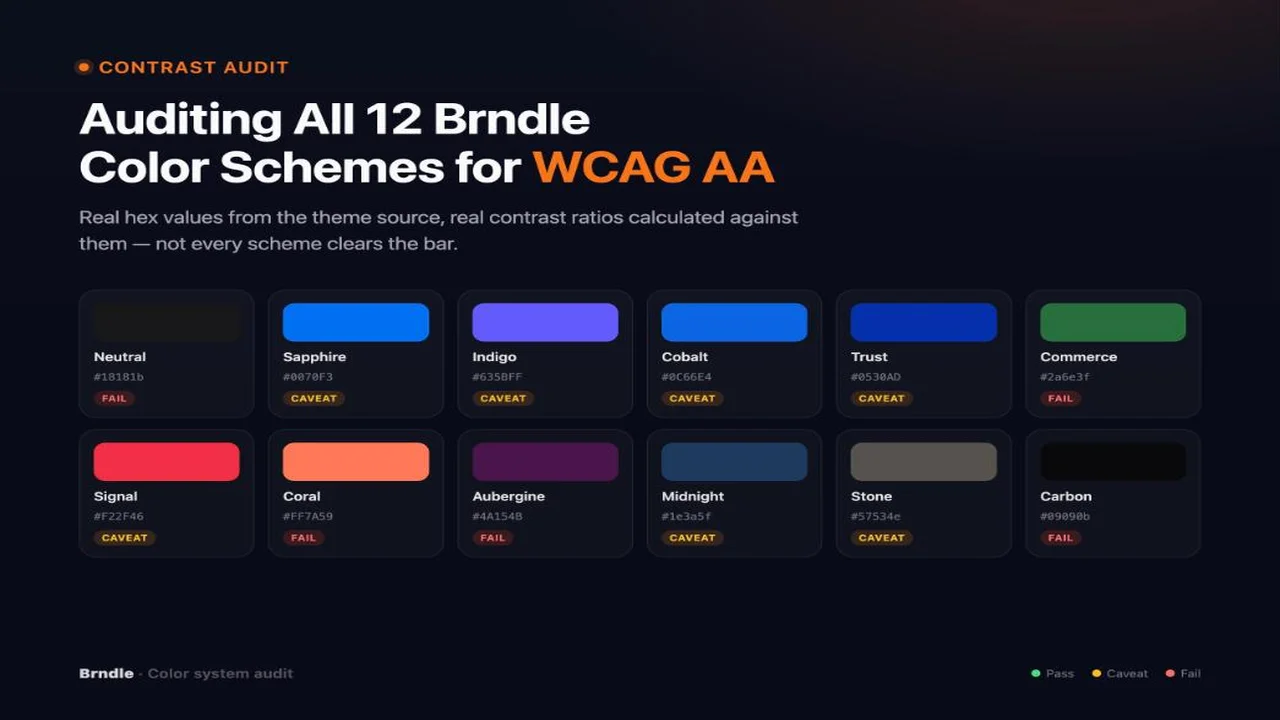
A theme’s “accessible by default” claim is cheap to write and expensive to prove. Brndle’s own marketing describes it as a readability and accessibility benchmark, and the theme ships twelve color schemes a site owner can switch between in one click, from the Brndle → Colors tab. That is twelve separate bets on contrast, not one. A benchmark claim that only holds for the default scheme is not a benchmark claim, it is a demo.
So we pulled the actual source. app/Settings/ColorPalette.php in the brndle-themes/brndle repository, read on 30 October 2026, contains the twelve preset names and hex values, and a generate() method that turns any one of those hex values into a full light-mode and dark-mode palette: surfaces, text, borders, and the foreground color that goes on top of a filled button. We ran that exact algorithm, in a faithful line-by-line port, against all twelve presets, then scored every text-and-background pair it produces against the WCAG contrast formula the file itself implements. This is that audit. It is not a repeat of our general WCAG 2.2 checklist for theme authors; it is that checklist’s contrast section, run against one theme’s real numbers, with the failures left in.
Table of contents
- Methodology: where the numbers came from
- The audit table: all 12 schemes, light and dark mode
- How to read the table
- A closer look at the borderline and failing cases
- How to re-verify this yourself
- What this means for client work
- FAQ
- The takeaway
Methodology: where the numbers came from
Two files, read directly from the public repository, supplied every color value in this post. Nothing here is estimated or recreated from a screenshot.
app/Settings/ColorPalette.php defines presets(), an array of twelve accent colors with a human name and a tone flag (‘light’ or ‘dark’, describing the accent itself), and generate(string $hex), which takes one accent and derives everything else: a hover and two lighter accent variants; three light-mode surfaces and three dark-mode surfaces, the dark ones tinted toward the accent’s hue; fixed text colors for both modes; and on-accent / dark-on-accent, the color a button’s label takes when it sits on top of the accent fill. That last pair is decided with one line: relativeLuminance($hex) > 0.4 ? '#09090b' : '#ffffff'. We will come back to that line, because it is where most of this audit’s bad news lives.
The same file also implements the three functions WCAG defines: hexToHsl / hslToHex for the color math, relativeLuminance(), and contrastRatio(), which is the standard (L1 + 0.05) / (L2 + 0.05) ratio of relative luminances, lighter over darker. We ported these four functions to Python, line for line, rather than writing our own and risking a rounding mismatch with the theme’s own logic. The port is mechanical: same HSL conversion, same linearization curve for luminance (sRGB values at or under 0.04045 divided by 12.92, everything else through the ((c + 0.055) / 1.055) ** 2.4 curve), same ratio formula. We then called generate() once per preset and scored eight pairs per scheme against the result.
This is a narrower, more mechanical question than the derivation problem we wrote about in 7 of 11 Themes Failed Contrast, where the foreground color had to be computed at render time because the background came from an unknown host theme. Here every background and every accent is known in advance, so there is no excuse for a pair that fails: the only question is whether the generator’s own math clears its own stated bar.
What AA requires, for reference: 4.5:1 for normal text, and 3:1 for large text (at least 18 point, or 14 point bold) and for the non-text parts of UI components, such as a focus ring or an input border. A filled button’s own label is still text, so unless that label is set at the large-text size, 4.5:1 is the bar it has to clear, not 3:1. We flag any pair that lands between 3:1 and 4.49:1 as caveat, because it is legal for a border or a large headline and illegal for a 14px link or button label, which is how it is actually used in the theme’s own CSS. Anything under 3:1 is a plain fail, with no size of text that makes it legal.
Eight pairs, per scheme: light-mode body text, light-mode secondary text, light-mode accent-as-link text (the theme.json link element sets its text color to var(--color-accent)), light-mode button label (on-accent on accent), and the same four in dark mode, using dark-text-primary, dark-text-secondary, dark-accent, and dark-on-accent against dark-surface-primary. Four of the eight (body and secondary text, in each mode) use hardcoded colors that do not depend on the accent at all, so they come out nearly identical across all twelve schemes. The other four move with the accent, and that is where the differences in this audit live.
The audit table: all 12 schemes, light and dark mode
Body text and secondary text first, because they are constant. Light mode: #09090b text on the #fafafa surface measures 19.06:1 in every scheme; secondary text at #52525b measures 7.41:1 in every scheme. Dark mode: #fafafa text on the generated dark surface lands between 17.87:1 and 18.20:1 depending on how much the surface tints toward the accent’s hue; secondary text at #a1a1aa lands between 7.28:1 and 7.41:1. All comfortably clear AA, in every one of the twelve schemes, in both modes. That part of the benchmark claim holds everywhere, and it is the main reason body copy is readable no matter which of the twelve presets a site owner picks.
The four accent-dependent pairs are where the scheme choice matters:
| Scheme | Accent hex | Tone | Light link | Light button | Dark link | Dark button | Verdict |
|---|---|---|---|---|---|---|---|
| Neutral | #18181b | dark | 16.97 Pass | 17.72 Pass | 2.08 Fail | 9.05 Pass | Fail (dark link) |
| Sapphire | #0070F3 | light | 4.36 Caveat | 4.55 Pass | 4.13 Caveat | 4.55 Pass | Caveat |
| Indigo | #635BFF | light | 4.50 Pass | 4.70 Pass | 4.04 Caveat | 4.70 Pass | Caveat (dark link) |
| Cobalt | #0C66E4 | light | 4.98 Pass | 5.20 Pass | 3.61 Caveat | 5.20 Pass | Caveat (dark link) |
| Trust | #0530AD | dark | 9.90 Pass | 10.33 Pass | 3.41 Caveat | 5.54 Pass | Caveat (dark link) |
| Commerce | #2a6e3f | dark | 5.92 Pass | 6.18 Pass | 7.39 Pass | 2.52 Fail | Fail (dark button) |
| Signal | #F22F46 | light | 3.82 Caveat | 3.98 Caveat | 4.75 Pass | 3.98 Caveat | Caveat (weak all round) |
| Coral | #FF7A59 | light | 2.46 Fail | 2.57 Fail | 7.33 Pass | 2.57 Fail | Fail (3 of 4) |
| Aubergine | #4A154B | dark | 13.41 Pass | 14.00 Pass | 2.84 Fail | 6.62 Pass | Fail (dark link) |
| Midnight | #1e3a5f | dark | 11.02 Pass | 11.50 Pass | 3.38 Caveat | 5.55 Pass | Caveat (dark link) |
| Stone | #57534e | dark | 7.31 Pass | 7.63 Pass | 5.20 Pass | 3.60 Caveat | Caveat (dark button) |
| Carbon | #09090b | dark | 19.06 Pass | 19.90 Pass | 1.61 Fail | 11.73 Pass | Fail (dark link, worst of 12) |
Light link is the accent used as inline link-text color on the light surface. Light button is the button label color (on-accent) against the accent fill. Dark link and dark button are the same two uses with the dark-mode tokens, dark-accent and dark-on-accent, against dark-surface-primary.
How to read the table
Three honest conclusions, in order of how much they should change what you pick.
Zero of the twelve schemes clear every one of the four accent-dependent checks at full AA. Every single preset has at least one caveat or fail somewhere in the table, and in eleven of the twelve cases it is the dark-mode link color that is the weak point. That is a real, specific gap, not a rounding artifact: seven schemes (Sapphire, Indigo, Cobalt, Trust, Signal, Midnight, Stone) land in the 3-to-4.49 caveat band on at least one pair without ever dropping under 3:1, and five (Neutral, Commerce, Coral, Aubergine, Carbon) drop under the 3:1 floor outright on at least one pair.
Light mode is in much better shape than dark mode. Scored on light-mode link and button text alone, nine of twelve schemes pass both checks cleanly: Neutral, Indigo, Cobalt, Trust, Commerce, Aubergine, Midnight, Stone, and Carbon. One, Sapphire, is a genuine caveat (the button passes at 4.55, the link text falls just short at 4.36). Two, Signal and Coral, fail outright on both light-mode pairs, and Coral fails badly enough that it should not be used as link-colored or button-label text at normal size in light mode at all.
The worst single number in the whole audit, 1.61:1 for Carbon’s dark-mode link text, is not a wild outlier, it is the predictable result of the algorithm’s own math. Carbon’s accent is #09090b, already nearly black. The generator’s dark-mode accent rule lightens any accent with lightness under 40 by twenty points, and #09090b has a lightness near zero, so it becomes a muted gray, #373743. That sits right next to Carbon’s generated dark surface, #111113, which is tinted from the same near-zero-saturation hue. Two colors derived from the same starting point, both dark, end up close enough to each other that the “lighten it by twenty” rule cannot create enough separation. Neutral (2.08:1) and Carbon (1.61:1) share the identical failure mode for the identical reason: a near-black, near-gray accent has nowhere to go that both reads as “the brand color” and clears 4.5:1 against a dark surface built from the same hue.
A closer look at the borderline and failing cases
Coral: the only scheme that fails in both modes
Coral’s accent, #FF7A59, is light enough in HSL lightness (69.8) that relativeLuminance() comes out above 0.4, so the generator assigns black (#09090b) as the label color for buttons, in both light and dark mode, since Coral’s tone is ‘light’ and its dark-accent stays the raw hex. Black on a bright coral orange measures 2.57:1. That is not a near-miss; it is roughly half of the 4.5:1 floor, and it is below even the 3:1 floor for large text or UI components. The same accent used as link text on the light surface measures 2.46:1, for the same reason: it is simply too light and too saturated for either black or white to sit on it comfortably, and the generator only offers black or white, never a third option.
Commerce: a clean light mode hiding a dark-mode button failure
Commerce is the one case in this table where light mode is fine (5.92:1 link, 6.18:1 button) and the failure shows up specifically in dark mode, specifically on the button, not the link. The link passes in dark mode too, at 7.39:1. The button fails at 2.52:1. The reason is instructive: Commerce’s accent, #2a6e3f, has a lightness of 29.4, so the dark-mode rule lightens it to a brighter, more saturated green, #46b869, for use as the dark-mode accent and button fill. That brighter green then crosses the generator’s 0.4 luminance threshold, so dark-on-accent switches to black. Black on #46b869 only measures 2.52:1, because the green, while visually “bright,” still has a relative luminance closer to a mid-gray than the 0.4 cutoff implies for contrast purposes. The threshold decides a direction (go dark or go light) without checking whether the direction it picked actually clears AA once applied. That is the one place in this whole algorithm where a verified check instead of a binary split would have caught the problem before it shipped.
The fix is already sitting in the same file. ColorPalette::ensureContrast($fg, $bg, $minRatio) exists, and it is not called anywhere inside generate(). It iteratively nudges a foreground color’s lightness, in the correct direction for the background, until the pair clears a target ratio, falling back to pure black or white only if nothing in between works. Swapping the one-line binary split for a real ensureContrast() call on both on-accent and dark-on-accent would have caught Commerce’s dark-mode button and Coral’s two failures at generation time, not at audit time:
// Current: direction only, no verification.
'on-accent' => self::relativeLuminance($hex) > 0.4 ? '#09090b' : '#ffffff',

// Verified: same starting guess, checked and corrected if it falls short.
'on-accent' => self::ensureContrast(
    self::relativeLuminance($hex) > 0.4 ? '#09090b' : '#ffffff',
    $hex,
    4.5
),
The seven-scheme caveat band: safe for borders, not for inline text
Sapphire, Indigo, Cobalt, Trust, Signal, Midnight, and Stone each have at least one pair that lands between 3:1 and 4.49:1 without ever going lower. That is a real, usable range for a 2px focus outline, an input border, or an icon, all of which are governed by the 3:1 non-text-contrast rule (WCAG 1.4.11). It is not a legal range for a 14px or 16px link or button label, which needs 4.5:1 under 1.4.3 unless it is set at the large-text size (18pt / 24px regular, or 14pt / 18.66px bold). Five of those seven (Indigo, Cobalt, Trust, Midnight, and, less severely, Sapphire) land in this band specifically on the dark-mode link, which suggests the pattern is systemic rather than a property of any one hue: lightening an already-saturated accent by a flat amount is not the same operation as lightening it by enough to guarantee a target ratio against a background that is also accent-tinted.
How to re-verify this yourself
Treat every number above as something to check again, not something to take on faith, especially after a future Brndle release changes the generator. Three ways to do it, cheapest first.
In the browser, per element. Chrome and Firefox DevTools show a contrast ratio directly in the color picker when you inspect a text element: open the Styles panel, click the color swatch next to color, and the picker shows the computed ratio against the element’s background along with an AA/AAA pass indicator. This is the fastest way to spot-check one button or one link in one scheme without writing anything.
With a dedicated checker, per pair. WebAIM’s Contrast Checker takes two hex values and returns the exact ratio plus a pass/fail for both normal and large text at AA and AAA. Useful for confirming a specific pair this post names, such as Commerce’s dark-mode button at #09090b on #46b869.
Programmatically, for all twelve at once. The four functions below are the exact WCAG math, portable to any language. This is the Python version we used; the PHP original is the same four functions in ColorPalette.php.
def hex_to_rgb(h):
    h = h.lstrip('#')
    return tuple(int(h[i:i+2], 16) for i in (0, 2, 4))

def relative_luminance(hex_str):
    r, g, b = [c / 255 for c in hex_to_rgb(hex_str)]
    lin = lambda c: c / 12.92 if c <= 0.04045 else ((c + 0.055) / 1.055) ** 2.4
    return 0.2126 * lin(r) + 0.7152 * lin(g) + 0.0722 * lin(b)

def contrast_ratio(hex1, hex2):
    l1, l2 = relative_luminance(hex1), relative_luminance(hex2)
    lighter, darker = max(l1, l2), min(l1, l2)
    return (lighter + 0.05) / (darker + 0.05)

# contrast_ratio('#09090b', '#46b869') -> 2.52, Commerce's dark-mode button fail.
If you adopt the theme for a project and swap in a thirteenth, custom accent through the same hex input, run it through this function against both light-surface-primary (#fafafa) and whatever dark-surface-primary the hue generates, before you ship. The generator does not stop you from picking a Coral-shaped custom color, and nothing in the admin screen will tell you that it failed.
What this means for client work
If a project brief requires provable AA compliance and you are picking a built-in scheme rather than deriving a custom one, this audit gives you a short list rather than a shrug. The same contrast math applies if you instead derive a thirteenth, custom accent the way we describe in From a Tailwind Theme to theme.json: check the pair, do not assume it.
Light-mode-only builds, or builds where dark mode is a secondary nice-to-have: Neutral, Indigo, Cobalt, Trust, Commerce, Aubergine, Midnight, Stone, and Carbon pass both the link and button checks in light mode cleanly, no caveat. Sapphire is usable with one adjustment: its button passes, but its link text should either be bumped to the large-text size or set a shade darker than the raw accent token. Signal and Coral should not be used as inline link or button-label text at normal size in light mode without a manual override; both fail outright, and Coral fails by roughly half the required ratio.
Builds that ship dark mode and need it held to the same bar: there is no clean pick. Every scheme needs at least one of two mitigations in dark mode: either increase the font size of accent-colored inline links to the large-text threshold (which legitimately drops the requirement to 3:1, a bar Sapphire, Indigo, Cobalt, Trust, Signal, Midnight, and Stone all clear), or override the dark-mode link color with a darkened or lightened variant that has actually been checked, rather than the raw dark-accent token. For Neutral, Commerce, Coral, Aubergine, and Carbon, the override is not optional. Those five drop under even the 3:1 floor on at least one accent-dependent pair, which no font-size adjustment fixes.
If the brief specifically calls for a warm, energetic accent and Coral or Signal was the instinctive pick for that reason, Commerce’s green or Trust’s blue do the same “confident call-to-action” job and pass both light-mode checks outright, which is a smaller compromise than overriding Coral’s button text on every template that uses it.
FAQ
Does “12 color schemes” mean all 12 pass WCAG AA everywhere?
No, and this audit is the proof rather than the assumption. All twelve pass cleanly on body text and secondary text, in both light and dark mode. None of the twelve clear every accent-dependent check (the accent used as link text or button label) at full AA in both modes at once; seven land in a caveat band on at least one pair, and five drop under even the 3:1 floor on at least one pair.
Which Brndle schemes are safest for a client site that must prove AA compliance?
For light mode specifically: Neutral, Indigo, Cobalt, Trust, Commerce, Aubergine, Midnight, Stone, and Carbon pass both the accent-as-link and accent-as-button checks without a caveat. No scheme passes dark mode’s accent-as-link check at full AA without either a larger font size or a manually overridden color.
Why does the same accent get a different verdict in light mode versus dark mode?
Because the background is different, and the generator derives the dark-mode surface by tinting toward the accent’s own hue rather than using a fixed neutral dark gray. An accent and a dark surface built from the same hue tend to sit closer together in luminance than that same accent does against a fixed light surface, which is why the dark-mode link checks fail or caveat far more often than the light-mode ones in this audit.
What is the real difference between the 4.5:1 and 3:1 thresholds, and which one applies to a button?
4.5:1 (WCAG 1.4.3) applies to normal-size text, including a button’s own label. 3:1 applies to large text (18pt/24px regular or 14pt/18.66px bold) and to non-text parts of UI components (1.4.11), such as a focus ring or an input border. A button’s filled background color against the page is a non-text UI component and only needs 3:1; the label printed on top of it is text and needs 4.5:1 unless it is set at the large-text size.
Can I use a custom accent color instead of the 12 presets, and is it still checked for contrast?
ColorPalette::generate() accepts any hex value, not only the twelve presets, and runs the identical derivation. It is not re-verified against AA at generation time for the accent-dependent pairs; the foreground choice is the same binary luminance split described above. A custom accent in Coral’s lightness-and-saturation range will reproduce Coral’s failure.
Does Brndle enforce any of this automatically, or is this audit informational only?
Based on the public source as read for this audit, the admin screen does not block a scheme choice or a custom accent on contrast grounds, and generate() does not call the theme’s own ensureContrast() utility for the pairs this audit flags. The numbers in this post describe what the generated CSS will contain, not a guarantee enforced by the theme.
How do I re-run this audit after a future Brndle update?
Re-fetch app/Settings/ColorPalette.php from the repository, diff the presets() array and the generate() method against what is quoted in this post, and re-run the four-function contrast script above against any changed values. If the hex values or the derivation logic changed, the ratios in this post’s table are stale and should not be cited as current.
What is the practical fix if my chosen scheme caveats or fails?
Two options, in order of effort. First, if the failing use is a link or label, raise its font size to the large-text threshold, which legally drops the requirement to 3:1 for any scheme that clears that floor (everything except the five outright fails: Neutral, Commerce, Coral, Aubergine, Carbon, on their specific failing pair). Second, override the specific CSS custom property (--color-accent for the light-mode link, dark-accent / dark-on-accent for dark mode) with a value you have personally run through a contrast checker against that scheme’s actual surface color.
Does a contrast failure here affect the theme’s accessibility-ready status from the other checklist post?
It can, for whichever scheme and mode is in use. The accessibility-ready requirements and our own WCAG 2.2 checklist both list sufficient color contrast as a required, testable item, checked per template and per style variation, not once for the theme as a whole. A site running Coral in light mode, with the button label at normal size, would fail that specific check even if every other item on the checklist passes.
Does contrast ratio alone cover color blindness?
No. Contrast ratio is a luminance comparison and says nothing about whether two colors are distinguishable to someone with a color vision deficiency; that is a separate concern, usually addressed by never using color alone to convey a state (the handbook’s “no ambiguous link text” and “use of color” requirements) and by checking critical UI with a color-blindness simulator. A pair can measure well above 4.5:1 in luminance and still be hard for some users to tell apart if the only difference is hue, for example a saturated red against a saturated green of similar lightness.
The takeaway
Twelve schemes, eight pairs each, ninety-six numbers pulled from the theme’s own public generation logic rather than guessed: body text and secondary text pass everywhere, in both modes, which is most of what “readable by default” is actually asking for. The part that does not hold up uniformly is the accent color used as interactive text, specifically in dark mode, where seven schemes land in a caveat band usable only for large text or non-text UI, and five drop under even that floor. Coral is the one scheme that should not be used as link or button-label text at normal size in either mode without an override. Commerce’s dark-mode button failure shows the one place a binary luminance split stood in for a verified check, and the fix for it is a function that already exists in the same file. A readability and accessibility benchmark claim is worth more when it survives this kind of audit partially rather than claiming it would have survived completely; publish the gaps, not just the badge.
Sources, read on 30 October 2026
- brndle-themes/brndle: app/Settings/ColorPalette.php, the 12 presets, the
generate()derivation, and thecontrastRatio/relativeLuminance/ensureContrastutilities - brndle-themes/brndle: theme.json, the base palette and the
linkelement’s accent-colored text rule - W3C: Understanding Contrast (Minimum)
- W3C: Understanding Non-text Contrast
- WebAIM Contrast Checker