Best Self-Hosted LMS Platforms in 2026
Every course platform sells you the same promise: hosting, payments, and student records handled for you. What the pitch leaves out is where that data actually lives. Rent a hosted platform and your course catalog, your student roster, and every dollar of revenue pass through a vendor’s servers under a vendor’s terms, terms that can change the week after you build your business on top of them.
Self-hosting an LMS flips that arrangement. The plugin runs on your own WordPress install, the database is yours, and nobody can lock you out of your own school. This guide compares the seven self-hosted LMS options worth putting on a shortlist in 2026, the same ownership lens we’ve used to compare self-hosted community platforms against Circle, applied here to course delivery instead of community feeds.
None of the seven options below is a bad plugin. What separates them is whether a complete school ships as one product or as a base LMS you spend months assembling with paid add-ons from several vendors, each with its own settings screen, its own update cycle, and its own support queue when something breaks.
In this guide
Key takeaways
- Self-hosted means the plugin, the database, and the student records sit on your own WordPress install, not a vendor’s servers.
- Learnomy is the only option here that bundles courses, certificates, checkout, and instructor payouts into one plugin instead of a base LMS plus several paid add-ons.
- LearnDash, Tutor LMS, LifterLMS, MasterStudy LMS, and LearnPress are all genuine WordPress plugins; Moodle is a separate self-hosted application, not a WordPress plugin.
- Moving between any of these means moving hosting, not moving to a subscription, since none of them charge a cut of what your students pay.
- Migrating away from LearnDash, Tutor LMS, or LifterLMS specifically is the one path with a dedicated import wizard on Learnomy; other moves mean manual export and rebuild.
What “self-hosted” actually means
A self-hosted LMS is software you install on your own web hosting rather than an account you rent from a SaaS vendor. The distinction sounds technical until something goes wrong: a hosted platform can raise its price, change its revenue split, or shut down its service entirely, and your course catalog goes with it. A self-hosted plugin lives in your WordPress database. Your hosting bill is separate from your course platform’s fate, and exporting your content means a standard WordPress export, not a support ticket asking a vendor to release your own data.
That ownership argument is the same one that drives creators toward self-hosted community platforms over Circle or Mighty Networks: the software category changes, but the underlying tradeoff between renting and owning stays identical. A self-hosted LMS still needs real hosting, and hosting isn’t free, but a competent WordPress host costs a fraction of what a mid-tier hosted course platform charges once you account for the percentage it takes on top of the subscription.
Self-hosting doesn’t mean “harder to use” the way it did a decade ago. Every plugin on this list ships a course builder aimed at instructors, not developers. The real tradeoff is that you’re responsible for updates, backups, and picking a host that can serve video reliably, work most self-hosted LMS builders happily hand off to a managed WordPress host rather than doing themselves.
The ownership argument also changes how a school handles growth. A hosted platform often gates its higher-volume features, more students, more instructors, deeper reporting, behind a higher subscription tier, so growth triggers a bigger bill on a fixed schedule. A self-hosted plugin ties cost to your actual hosting usage instead, which scales far more gradually and never charges you a percentage of a sale simply because your course finally started selling well.
The 7 best self-hosted LMS platforms for 2026
Six of the seven below are WordPress plugins you install like any other plugin. The seventh, Moodle, is a standalone self-hosted application with its own server requirements, included here because no honest self-hosted LMS roundup can skip the platform that originated the category.
1. Learnomy
Learnomy is a complete learning platform for WordPress rather than a course plugin that needs six add-ons bolted on before it functions like one. Courses support video, audio, PDF, and reading lessons through a drag-and-drop builder, and the assessment layer is built to hold up under real scrutiny: six quiz types with partial credit, a reusable question bank, and an anti-cheat tab-switch tracker that flags a learner who leaves the browser tab mid-quiz. An essay-grading inbox handles the questions a multiple-choice engine can’t score on its own.

Certificates are cryptographically signed and carry a QR code linking to a public verification page, so an employer or accreditation body can confirm a credential is real without emailing you to ask. Checkout runs directly through Stripe and PayPal with no fee taken from a sale, a WooCommerce adapter is available for sellers who already run a store, and memberships come with trial periods and an automatic pricing page. Once a school grows past a single instructor, built-in revenue sharing splits payouts the way a marketplace would for its own contributors, complete with instructor applications and individual dashboards. If you’re migrating an existing catalog, a built-in wizard imports directly from LearnDash, Tutor LMS, or LifterLMS.

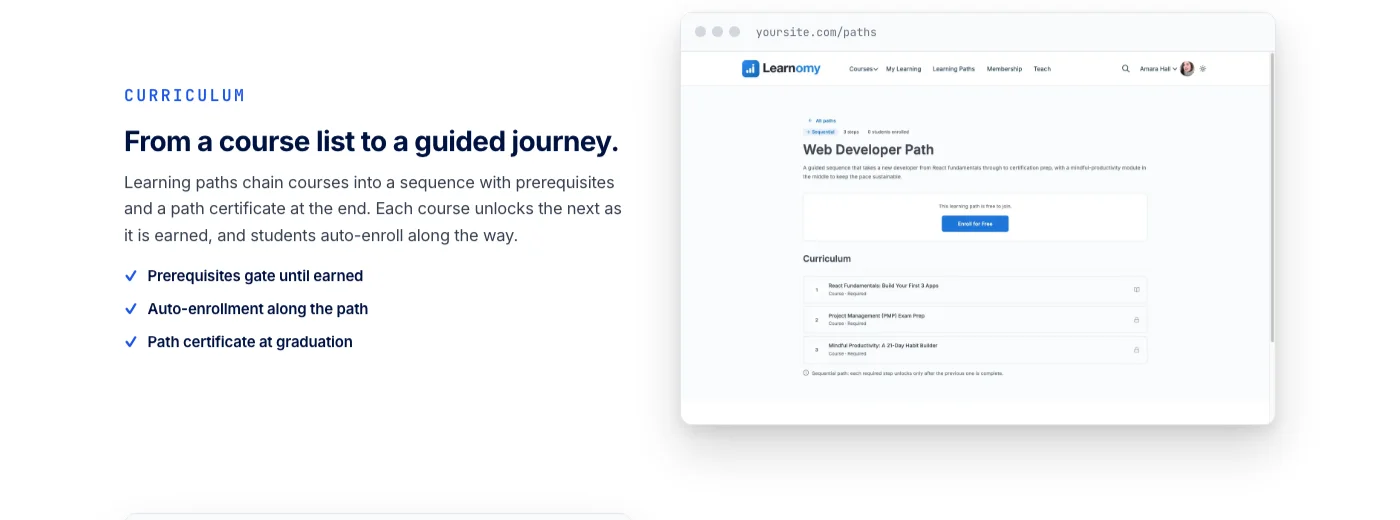
Learnomy doesn’t stop at course delivery either. The platform extends into a learning community around your school, discussion boards and Q&A alongside your courses, gamified learning with points, badges, and streaks, protection for your course videos against casual downloading, and a job board for your graduates, all from the same team, with a full design layer so the finished school looks like your brand rather than a template with your logo dropped on top. B2B team training, sequential learning paths with their own certificates, and deeper revenue analytics are available as the school scales past a single-instructor operation.
The plugin runs standalone with any WordPress theme rather than requiring a companion design, ships full-text course search and structured data markup so Google can understand a course page properly, and includes offline progress tracking for students on an unreliable connection. None of that requires stacking a search plugin, an SEO plugin, and a PWA plugin on top of the LMS the way a more modular platform would.

See what a complete learning platform looks like before comparing the rest of this list.
2. LearnDash
LearnDash has been the default answer to “how do I sell a course on WordPress” for long enough that its Course, Lesson, and Topic structure is close to an industry template other plugins imitate. Drip-feeding content by date or completion, focus mode for distraction-free lessons, and a dedicated analytics add-on for tracking engagement across a catalog all come standard once you’re inside the ecosystem.
The tradeoff shows up once you want anything beyond course delivery itself. Certificates, advanced quizzing, gamified badges, and community forums each live behind a separate add-on with its own settings screen and its own update cycle, and a WooCommerce or bbPress integration is usually required to round out payments or discussion. A creator who wants the full package ends up managing several plugins from several vendors rather than one coherent platform, the exact stacking problem a complete learning platform is designed to avoid. LearnDash remains a solid, well-documented choice for a team willing to do that assembly work themselves.
A hosted variant, LearnDash Cloud, exists for buyers who want the plugin’s course structure without managing WordPress hosting at all, which is worth knowing about if server management specifically is what’s holding you back from self-hosting rather than the platform’s features. Choosing that route reintroduces the recurring-fee tradeoff this guide is built around, so weigh it deliberately rather than defaulting to it.
3. Tutor LMS
Tutor LMS ships a generous free tier: a frontend course builder, quiz types, a certificate designer, and native support for embedding video from YouTube or Vimeo instead of forcing every lesson through self-hosted file storage. WooCommerce and Easy Digital Downloads both integrate directly for checkout, which makes Tutor LMS a reasonable pick for a seller who already runs a store and wants course sales to slot into an existing cart.
Content drip, subscription billing, a more advanced certificate builder, and deeper reporting sit in the paid add-on tier rather than the free plugin, so a school that grows past basic course delivery is back to the same pattern as LearnDash: a base plugin plus a stack of paid extensions to reach feature parity with a platform that ships those capabilities as one product. Tutor LMS is a fair starting point for a first course; it starts asking for add-ons the moment that course turns into a business with recurring students.
Community features follow the same pattern: a discussion layer around courses generally means pairing Tutor LMS with a separate forum or community plugin rather than getting one natively, so budget the extra setup time if class discussion matters to how you teach.
4. LifterLMS
LifterLMS leans into engagement mechanics more than any other plugin on this list. Triggers can award a badge, issue a certificate, or send an email automatically based on a student’s behavior, a lesson completed, a quiz passed, a course finished, which gives instructors a way to build a nudging sequence without writing custom code. A built-in gradebook and WooCommerce integration for payments round out the core.
Membership-gated course access, deeper reporting, and some of the more advanced engagement features again live behind paid add-ons layered on top of the free core, following the same modular pattern as LearnDash and Tutor LMS. LifterLMS is a strong fit specifically for a course-based membership site built around recurring engagement rather than a one-time course sale, provided you’re comfortable assembling the add-on stack that unlocks its full feature set.
5. MasterStudy LMS
MasterStudy LMS pairs its plugin with a companion WordPress theme built specifically for course sites, and the free version includes an Elementor-compatible drag-and-drop builder, a gradebook, and basic gamification through points and badges. Unlike most of this list, MasterStudy also supports scheduled live classes through Zoom and Google Meet integration in its paid tier, a genuine point of difference for a school that mixes self-paced content with live cohort sessions.
The theme dependency is worth weighing honestly: MasterStudy looks and performs best paired with its own theme, which narrows your design flexibility compared to a plugin built to work with any theme you already run. Advanced certificate design, deeper analytics, and the live-class integration itself require moving into the paid layer, the same pattern as every other plugin here except the one built as a complete platform from the start. If live sessions are a core part of how you teach rather than an occasional add-on, that tradeoff is worth accepting; if your courses are entirely self-paced, the theme lock-in buys you a feature you won’t use.
6. LearnPress
LearnPress is one of the most widely installed free WordPress LMS plugins, and its appeal is straightforward: a lightweight course builder, basic quizzes, and simple certificates, with a large enough install base that documentation and third-party tutorials are easy to find. For a small course site with modest ambitions, that simplicity is a genuine advantage over a heavier platform.
Paid courses require a separate payment add-on or a WooCommerce integration, and anything beyond the basics, advanced quiz types, content drip, deeper certificate customization, sits in ThimPress’s paid add-on catalog. LearnPress is a sensible entry point for a first course on a tight budget; expect to outgrow the free core fairly quickly once the course catalog grows past a handful of titles. Its large install base is a genuine asset when troubleshooting, since a plugin this widely used has more community-written tutorials and forum answers covering common setup problems than a newer, smaller competitor would.
7. Moodle
Moodle predates every WordPress LMS plugin on this list and remains the classic self-hosted option for a reason: it’s a dedicated learning management application, not a plugin bolted onto a general-purpose CMS, and it was built from the ground up for institutions running academic programs at scale. SCORM and xAPI support, granular role permissions across faculties and cohorts, and a plugin ecosystem covering everything from plagiarism detection to attendance tracking make it the standard choice for universities and large corporate training departments with dedicated IT staff to run it.
That institutional depth comes with real friction for anyone outside that use case. Moodle isn’t WordPress, so it doesn’t share your existing site’s theme, plugins, or user accounts, and it needs its own server stack, its own admin skill set, and its own ongoing maintenance separate from whatever WordPress site you already run. A hosted option like MoodleCloud removes the server management but reintroduces the recurring-fee tradeoff this whole guide is built to avoid. For an individual creator or a small school already running WordPress, a WordPress-native LMS plugin will get a course live with far less setup than standing up a parallel Moodle installation. For a university registrar’s office managing thousands of enrolled students against accreditation requirements, Moodle’s institutional depth is exactly what the job calls for, and no WordPress plugin, Learnomy included, is trying to replace that specific job.
How the options compare
A side-by-side view makes the real divide clearer than any individual writeup: whether a platform ships as one coherent product or as a base plugin you build out with add-ons.
| Platform | Best for | Full feature set requires |
|---|---|---|
| Learnomy | A complete school: courses, certificates, checkout, and instructor payouts in one platform | Nothing extra for the core school; optional extensions for B2B and learning paths |
| LearnDash | Established course delivery with a large add-on ecosystem | Separate add-ons for certificates, gamification, and community |
| Tutor LMS | Sellers already running WooCommerce or EDD | Paid add-ons for drip content, subscriptions, and advanced reporting |
| LifterLMS | Course-based membership sites with engagement triggers | Paid add-ons for membership gating and deeper reporting |
| MasterStudy LMS | Schools mixing self-paced courses with live Zoom or Meet sessions | Its companion theme, plus a paid tier for live classes and analytics |
| LearnPress | A first course on a tight budget | Add-ons for payments, advanced quizzes, and certificates |
| Moodle | Universities and large institutional training programs | Dedicated server infrastructure and admin staff, separate from WordPress |
Buying criteria: what actually matters
- Whether the feature set is one product or an add-on stack. Check what ships in the base install versus what requires a separate purchase from the same vendor. A platform that bundles certificates, checkout, and payouts natively is a fundamentally different maintenance burden than one where each capability is its own plugin with its own settings screen.
- Payment ownership. Confirm whether checkout runs directly through Stripe or PayPal or requires a separate commerce plugin layered on top. A direct integration means fewer moving parts and one less system that can break during a checkout flow.
- Migration path, both in and out. If you’re already running LearnDash, Tutor LMS, or LifterLMS, check whether your target platform has a dedicated import tool for that specific plugin rather than a generic CSV export you’ll rebuild by hand.
- Theme independence. A plugin that works with any WordPress theme keeps your design options open. A plugin tied to a companion theme locks your visual identity to that vendor’s design system, which matters more the longer you plan to run the school.
- What happens past one instructor. Built-in revenue sharing and instructor dashboards matter the moment a solo course becomes a multi-teacher school. Retrofitting that structure onto a single-instructor setup later is far more disruptive than choosing a platform that supports it from day one.
- How students actually take a course on a phone. A large share of students will start or finish a lesson on mobile. Confirm the course player, quiz interface, and certificate delivery all work cleanly on a small screen before assuming desktop testing is enough.
Hosting and ownership considerations
Self-hosting shifts real responsibilities onto you, and pretending otherwise does new adopters no favors. Backups, security updates, and uptime become your job or your host’s job rather than a SaaS vendor’s, which is exactly why picking a managed WordPress host with automatic backups and a real support team matters more for a course business than it does for a simple blog. A student who can’t access a paid course because of a lapsed backup is a support problem you created, not one a vendor solved for you.
Security matters more for a course business than it does for a typical brochure site too, since a course platform stores paying customers’ personal data and payment records rather than just marketing copy. Keep the LMS plugin, WordPress core, and any payment-related extensions updated on a real schedule, and choose a host that patches server-level vulnerabilities without waiting for you to notice them first.
Video delivery deserves its own line item in that planning. Serving lesson video directly from your own web host works for a small catalog with light traffic, but it gets slow and expensive fast once dozens of students are streaming simultaneously. Most serious self-hosted schools route video through a dedicated streaming service built for that job rather than uploading raw files to their own server, and a platform built to integrate with external video delivery, the way Learnomy is, saves that migration for later rather than forcing it on day one.
The upside that justifies all of this is durable: your student database, your course content, and your payment history live in a standard, exportable format on infrastructure you control. If your hosting provider raises prices, you can move hosts without losing a single student record. If a hosted platform vendor changes its terms or shuts down, you have no equivalent option, since your data was never really yours to move in the first place.
Common mistakes when choosing a self-hosted LMS
Picking a plugin based on its free-tier feature list without checking what the full experience actually costs in add-ons. A “free” LMS that needs four paid extensions to match a complete platform’s out-of-box feature set isn’t the budget option it first appears to be, and the total cost of that add-on stack often exceeds a single-vendor platform once everything is tallied.
Underestimating video hosting until the first cohort actually starts streaming lessons simultaneously. Plan bandwidth and a dedicated video delivery approach before launch, not after a student complains about buffering during a live cohort’s first week.
Choosing a theme-locked LMS before confirming you’re comfortable with that theme long-term. Switching a course platform later is disruptive on its own; switching both the platform and your entire site’s visual identity at the same time multiplies that disruption unnecessarily.
Assuming migration between self-hosted plugins is automatic. Outside of a dedicated import wizard built for a specific source plugin, moving course content, quiz structures, and student progress between platforms generally means manual export and rebuild, so plan any switch around a natural break point in your academic calendar rather than mid-cohort.
Treating self-hosting as a one-time setup task rather than an ongoing responsibility. A course platform that stores paying students’ data needs the same update discipline as any other piece of production software, not a plugin installed once and left untouched for years while WordPress core and every dependency around it keeps moving forward.
Frequently asked questions
What does “self-hosted LMS” actually mean?
A self-hosted LMS is a plugin or application that runs on your own web hosting rather than a vendor’s servers. Your course content, student records, and payment history live in your own database, and you control updates, backups, and where the data physically lives, rather than renting access to someone else’s system.
Is a self-hosted LMS actually free, or just free of a subscription?
It depends on the plugin. Several options on this list have a genuinely capable free core with paid add-ons layered on top for advanced features, so “free” often means free of a recurring platform fee on your revenue, not free of every possible cost. You’ll still pay for WordPress hosting, and potentially for extensions once your needs grow past the base plugin.
Can I migrate from LearnDash, Tutor LMS, or LifterLMS to another self-hosted LMS?
Learnomy ships a built-in migration wizard for exactly those three plugins, importing courses, lessons, and structure directly rather than requiring a manual rebuild. Moving between other combinations on this list generally means exporting content manually and reconstructing quizzes, certificates, and student progress by hand, since a dedicated import tool for every possible pairing doesn’t exist across the category.
Does a self-hosted LMS require me to manage video hosting myself?
Not necessarily. Most self-hosted LMS plugins support embedding video from an external service rather than forcing every lesson through your own server’s file storage, which is the approach worth taking once a catalog grows past a handful of short videos. Uploading raw video files directly to your web host works for a small catalog but becomes slow and expensive at real scale.
Which self-hosted LMS is best for a single instructor starting their first course?
Learnomy’s free core covers course delivery, quizzes, certificates, and checkout without requiring any paid add-ons to reach a complete first launch, which matters for someone testing whether a course idea works before investing further. LearnPress or Tutor LMS are reasonable lighter-weight alternatives if your needs are genuinely minimal and you don’t expect to need certificates or built-in checkout right away.
Which option makes sense for a university or large institution?
Moodle remains the standard choice for institutional deployments managing thousands of enrolled students against accreditation and compliance requirements, backed by dedicated IT staff who can run its own server stack. A WordPress-native LMS plugin is built for a different job: a single school or department running on an existing WordPress site, not a university-wide academic records system.
Do self-hosted LMS plugins support live classes?
Support varies by plugin. MasterStudy LMS includes scheduled live sessions through Zoom and Google Meet integration in its paid tier. Most other plugins on this list, Learnomy included, focus on self-paced course delivery and expect live sessions to run through a separate dedicated video conferencing or events tool rather than a built-in classroom feature.
What happens to my course if I stop paying my hosting bill?
Your site goes offline the same way any WordPress site would, but the difference from a hosted platform is what happens next: your database backup can move to any other WordPress host, and your course content comes back online with the same plugin, the same structure, and the same student records intact. That portability is the entire argument for self-hosting in the first place; a hosting problem is temporary, while losing access to a vendor’s platform can be permanent.
Is a self-hosted LMS accessible on mobile and usable in other languages?
Most of the established plugins on this list, Learnomy included, ship responsive course players that work on a phone browser without a separate app, along with translation-ready strings for running a course site in a language other than English. Confirm RTL layout support specifically if you’re teaching in Arabic, Hebrew, or another right-to-left language, since that support varies more between plugins than basic translation does.
Own the school, not just the courses.
Learnomy bundles courses, certificates, checkout, and instructor payouts into one WordPress platform, with no add-on stack required to reach a complete school and no cut taken from what your students pay you.
Every platform on this list will get a course online. The real decision is how much of your school you want to own outright versus how much you’re comfortable assembling from separate add-ons or handing to institutional infrastructure built for a different scale entirely. Start from what you’re actually building, a first course, a multi-instructor academy, or a university program, and the right self-hosted option narrows fast. Whichever plugin you choose, the underlying win is the same one this whole guide has been arguing for: a school that keeps running on infrastructure you control, regardless of what any single vendor decides to do next. For a broader look at e-learning software beyond the self-hosted category, including hosted platforms and institutional systems, see our comparison of software for e-learning platforms.