Should a Block Theme Register Abilities? What Theme Authors Can Expose to AI Agents, and What Belongs in a Plugin
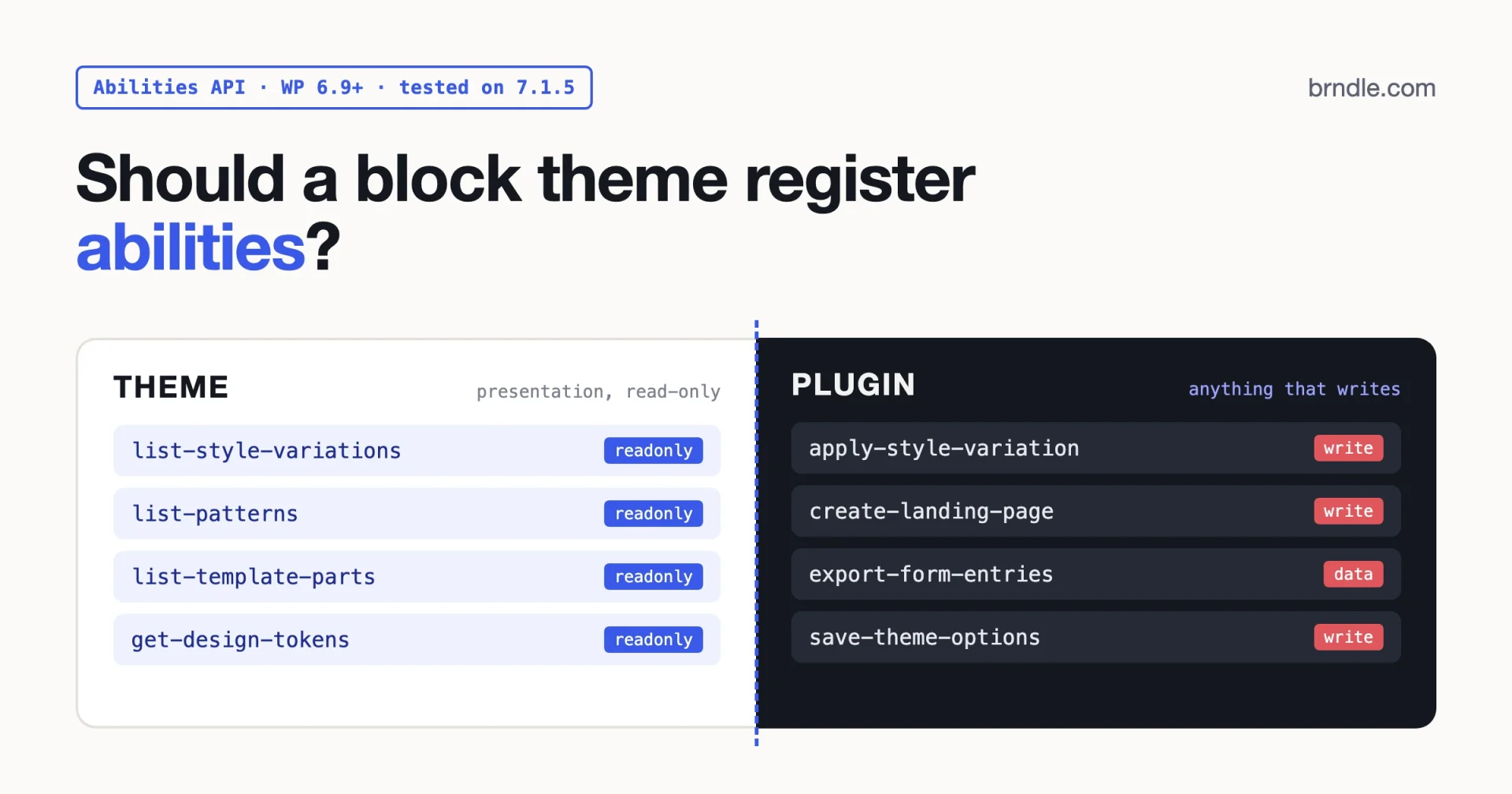
Short answer: a block theme can register abilities, because the WordPress Abilities API lets plugins, themes and core all add them. It usually should not. Anything that does work on the site (creating pages, saving settings, storing form entries, changing a style variation) belongs in a plugin. A theme can defend a small set of read-only abilities that describe its own presentation layer: its style variations, block patterns, template parts and theme.json tokens.
Even those read better from a small companion plugin, because they keep working when the client switches themes. Below is the reasoning, a decision table, a working plugin we tested on WordPress 7.1.5, and an honest account of where Brndle stands today.
Checked on 21 November 2026 against WordPress 7.1.5 (the current release), the WordPress 7.2 RC2 source, and MCP Adapter 0.7.2.
What is the WordPress Abilities API?
The Abilities API is a registry of named, permission-checked units of work that WordPress shipped in core with version 6.9. Each ability has a name like my-plugin/get-post-count, a label and description, a JSON Schema for its input and output, an execute callback, and a permission callback. Software that wants to act on the site (an AI agent, an automation tool, another plugin) can ask the registry what the site can do and then run one of those abilities with validated input.
The WordPress 6.9 dev note (10 November 2025) lists the pieces:
wp_register_ability(),wp_unregister_ability(),wp_has_ability(),wp_get_ability()andwp_get_abilities()for abilities.wp_register_ability_category()and its siblings for categories. Every ability must belong to exactly one category, and the category has to exist first.- Two registration hooks:
wp_abilities_api_categories_initfor categories andwp_abilities_api_initfor abilities. Register anywhere else and WordPress raises a_doing_it_wrong()notice and the registration fails. - REST endpoints under
wp-abilities/v1for listing and running abilities, but only for abilities that opt in.
The PHP reference adds the part theme authors should read twice. permission_callback is required. meta.annotations carries three hints: readonly, destructive and idempotent. Note the defaults: destructive is true unless you say otherwise. Names may only use lowercase letters, numbers, hyphens and one forward slash.
Core itself registers only three abilities in 7.1.5, all read-only: core/get-site-info and core/get-environment-info (both need manage_options) and core/get-user-info (any logged-in user). We read that straight from wp-includes/abilities.php in the 7.1.5 tag.
What changed between WordPress 6.9 and 7.2?
The API has moved quickly. If you read a tutorial from late 2025, some of the exposure rules have changed since. This is the state as of 21 November 2026:
| Version | What it added for abilities | Source |
|---|---|---|
| 6.9 (December 2025) | The API itself, categories, JSON Schema validation, wp-abilities/v1 REST routes behind meta.show_in_rest, three core abilities | 6.9 dev note |
| 7.0 | The WP AI Client merged into core, which gives abilities a built-in consumer to call as tools | 7.1 merge proposal, which states the AI Client merged in 7.0 |
| 7.1 | A single meta.public exposure flag, wp_ability_validate_input and wp_ability_validate_output filters, a wp_ability_invoked action that fires on every call | public flag dev note, 7.1 improvements |
| 7.2 (RC2, release planned 8 December 2026) | Read abilities for core data: core/content-query, core/users-query, core/settings-get, plus a show_in_abilities opt-in for post types and settings | 7.2 schedule, trunk source |
The 7.2 abilities matter for this question. Once core can already answer “what content exists” and “what are the site settings”, a theme has even less reason to register anything that touches content or options.
How does an ability reach an AI agent?
Through the MCP Adapter, the official WordPress package that turns abilities into Model Context Protocol tools, resources and prompts. Version 0.7.2 was released on 19 November 2026. It ships a default server at /wp-json/mcp/mcp-adapter-default-server and can also run over STDIO through WP-CLI.
Two details decide whether your ability is visible at all:
- Abilities are private by default. The adapter only exposes an ability whose
meta.public(ormeta.mcp.public) istrue. The default server then reaches it through three meta-tools:mcp-adapter/discover-abilities,mcp-adapter/get-ability-infoandmcp-adapter/execute-ability. - REST exposure depends on the WordPress version. On 6.9 and 7.0 you still need
meta.show_in_restfor the REST routes. From 7.1,public => truemakesshow_in_restdefault to true, and an explicitshow_in_restvalue always wins.
The 7.1 dev note is blunt about one thing: exposure is not authorisation. A public ability is visible, but the permission callback still decides who may run it.
Can a block theme register abilities at all?
Yes. Nothing in core stops it. The 6.9 dev note describes the API as letting “plugins, themes, and WordPress core” register capabilities, and the developer handbook’s getting started page says its plugin example “could also be adapted for a theme’s functions.php”. We ran a theme-side ability (shown later) on 7.1.5 and it registered and executed without complaint.
So the real question is not “can it” but “should it”, and for that the best guide is the WordPress.org theme review requirements. We read the current page on 21 November 2026. It does not mention abilities. It does say themes must not include custom post types, custom blocks, custom roles, shortcodes or “functionality that is not related to design and presentation”, and it lists examples of plugin territory: analytics, SEO options, contact forms, non-design meta boxes, resource caching and social buttons. It also tells themes to use edit_theme_options rather than a role or manage_options when checking permissions.
Apply that rule to abilities and the answer sorts itself out. An ability is a door into functionality. If the functionality behind the door is presentation, a theme can own it. If it is anything else, the door belongs to a plugin.
Which abilities are theme territory and which are plugin territory?
Here is how we sort the ideas theme authors actually ask about. The test in the last column is the one we use: would the ability still make sense the day after the client switches to another theme?
| Ability idea | Where it belongs | Why |
|---|---|---|
| List the theme’s style variations | Theme is defensible, plugin is better | Read-only presentation data. A generic plugin can read it for any block theme. |
| List block patterns by category | Theme is defensible, plugin is better | Same. Core’s pattern registry already holds theme and plugin patterns together. |
| List template parts (header, footer, sidebar) | Theme is defensible, plugin is better | Read-only, and get_block_templates() already returns them. |
| Return theme.json tokens (palette, font sizes, spacing) | Theme | Pure design data, scoped to this theme, gone when the theme goes. That is fine. |
| Apply a style variation or change global styles | Plugin | A write. It changes site state and needs careful permission and undo thinking. |
| Create or edit pages with the theme’s patterns | Plugin (or core’s 7.2 abilities) | Content creation is not presentation. Content must outlive the theme. |
| Read or export form submissions | Plugin | Contact forms are named plugin territory. Entries are personal data. |
| Save theme options through an agent | Plugin | A write to options, and a theme switch strands the workflow. |
| SEO meta, analytics, cache purge | Plugin | All three are listed as plugin territory by the theme review team. |
| Install or activate plugins | Never from a theme | The requirements say plugins are installed only by user action. |
Notice the pattern. Every write lands in the plugin column.
What can a block theme reasonably expose to AI agents?
The useful, safe set is small and read-only. An agent that builds a landing page on your theme needs to know what it is allowed to use: which patterns exist, which template parts frame the page, which style variations a client can pick, and which palette slugs and font sizes are defined in theme.json. Give it that, and it stops inventing hex codes and pasting raw HTML into Custom HTML blocks.
Four rules keep that set honest:
- Read-only, and say so. Set
readonly => true,destructive => falseandidempotent => true. Remember thatdestructivedefaults totrue, so leaving annotations out tells every client your harmless list is dangerous. - Use
edit_theme_options. It is the capability the Site Editor uses and the one the theme review team asks for. Anonymous visitors do not need your pattern catalogue. - Return names, not markup. A slug and a title per item is enough for an agent to choose. Full pattern HTML can be large, and the agent can request content through core abilities when it needs it.
- No secrets, no personal data. Presentation data has neither, which is part of why it is safe to expose.
Theme-scoped tokens are the one case we would happily leave inside a theme. They are only meaningful for that theme, so losing them on a theme switch is correct behaviour. Here is a theme-side version, namespaced to the theme slug, using core’s own site category so the theme does not even register a category:
<?php
// Inside a theme: keep it read-only, namespaced to the theme slug, and guarded.
if ( class_exists( 'WP_Ability' ) ) {
	add_action( 'wp_abilities_api_init', 'mytheme_register_abilities' );
}

function mytheme_register_abilities(): void {
	wp_register_ability(
		'mytheme/get-design-tokens',
		array(
			'label'               => __( 'Get design tokens', 'mytheme' ),
			'description'         => __( 'Returns the colour palette and font sizes defined in this theme\'s theme.json.', 'mytheme' ),
			'category'            => 'site',
			'output_schema'       => array( 'type' => 'object' ),
			'execute_callback'    => static function (): array {
				return array(
					'palette'    => wp_get_global_settings( array( 'color', 'palette', 'theme' ) ),
					'font_sizes' => wp_get_global_settings( array( 'typography', 'fontSizes', 'theme' ) ),
				);
			},
			'permission_callback' => static function (): bool {
				return current_user_can( 'edit_theme_options' );
			},
			'meta'                => array(
				'annotations'  => array( 'readonly' => true, 'destructive' => false, 'idempotent' => true ),
				'show_in_rest' => true,
			),
		)
	);
}
We ran this on WordPress 7.1.5 with Twenty Twenty-Five active. It returned the theme’s 8 palette entries and 5 font sizes, starting with {"color":"#FFFFFF","name":"Base","slug":"base"}.
What must live in a companion plugin?
Everything that writes, everything that stores data, and everything a client would miss after a redesign. There are three practical reasons beyond the review guidelines.
Theme switches break agent workflows. An agency builds an automation that asks an agent to “publish the weekly offer page using our CTA pattern”. If the abilities behind it live in the theme, the first redesign kills the automation silently. Abilities in a plugin survive.
Permission design is harder than it looks. A write ability needs input validation, a capability check scoped to the object (edit_post for a given post, not a blanket edit_posts), and a clear answer to “what happens if the agent calls it twice”. That is product work with its own release cycle. Bolting it onto a theme ties security fixes to theme releases.
Core is taking the content layer. The 7.2 abilities read content, users and settings, and the merge proposal says management abilities come next. A theme that ships its own “create page” ability today will be competing with core next year.
A working example: read-only theme abilities registered from a plugin
This plugin works with any block theme. It registers one category and three read-only abilities that list style variations, block patterns (optionally filtered by category) and template parts. All three require edit_theme_options. Drop it in wp-content/plugins/theme-presentation-abilities/theme-presentation-abilities.php and activate it.
<?php
/**
 * Plugin Name:       Theme Presentation Abilities
 * Description:       Read-only abilities that describe the active block theme's presentation layer (style variations, patterns, template parts) to AI agents.
 * Version:           1.0.0
 * Requires at least: 6.9
 * Requires PHP:      8.1
 * License:           GPL-2.0-or-later
 * Text Domain:       theme-presentation-abilities
 */

defined( 'ABSPATH' ) || exit;

// WordPress 6.8 and older have no Abilities API: do nothing there.
if ( ! class_exists( 'WP_Ability' ) ) {
	return;
}

/**
 * Who may read theme presentation data. edit_theme_options is the
 * capability the Site Editor itself uses for this information.
 */
function tpa_can_read_theme(): bool {
	return current_user_can( 'edit_theme_options' );
}

/**
 * Shared meta: read-only, never destructive, safe to repeat.
 * 'public' is the WordPress 7.1 flag; 'show_in_rest' keeps
 * REST exposure working on 6.9 and 7.0.
 */
function tpa_read_only_meta(): array {
	return array(
		'annotations'  => array(
			'readonly'    => true,
			'destructive' => false,
			'idempotent'  => true,
		),
		'public'       => true,
		'show_in_rest' => true,
	);
}

add_action( 'wp_abilities_api_categories_init', 'tpa_register_category' );
function tpa_register_category(): void {
	wp_register_ability_category(
		'theme-presentation',
		array(
			'label'       => __( 'Theme presentation', 'theme-presentation-abilities' ),
			'description' => __( 'Read-only information about how the active theme looks.', 'theme-presentation-abilities' ),
		)
	);
}

add_action( 'wp_abilities_api_init', 'tpa_register_abilities' );
function tpa_register_abilities(): void {
	$item_list = array(
		'type'  => 'array',
		'items' => array(
			'type'       => 'object',
			'properties' => array(
				'slug'  => array( 'type' => 'string' ),
				'title' => array( 'type' => 'string' ),
			),
		),
	);

	wp_register_ability(
		'theme-presentation/list-style-variations',
		array(
			'label'               => __( 'List style variations', 'theme-presentation-abilities' ),
			'description'         => __( 'Lists the style variations (alternate theme.json files in /styles) that the active block theme ships.', 'theme-presentation-abilities' ),
			'category'            => 'theme-presentation',
			'output_schema'       => $item_list,
			'execute_callback'    => 'tpa_list_style_variations',
			'permission_callback' => 'tpa_can_read_theme',
			'meta'                => tpa_read_only_meta(),
		)
	);

	wp_register_ability(
		'theme-presentation/list-patterns',
		array(
			'label'               => __( 'List block patterns', 'theme-presentation-abilities' ),
			'description'         => __( 'Lists registered block patterns, optionally filtered by one pattern category slug.', 'theme-presentation-abilities' ),
			'category'            => 'theme-presentation',
			'input_schema'        => array(
				'type'                 => 'object',
				'properties'           => array(
					'category' => array(
						'type'        => 'string',
						'description' => __( 'Pattern category slug, for example "header".', 'theme-presentation-abilities' ),
						'pattern'     => '^[a-z0-9-]*$',
					),
				),
				'additionalProperties' => false,
			),
			'output_schema'       => $item_list,
			'execute_callback'    => 'tpa_list_patterns',
			'permission_callback' => 'tpa_can_read_theme',
			'meta'                => tpa_read_only_meta(),
		)
	);

	wp_register_ability(
		'theme-presentation/list-template-parts',
		array(
			'label'               => __( 'List template parts', 'theme-presentation-abilities' ),
			'description'         => __( 'Lists the template parts (header, footer and others) available to the active block theme.', 'theme-presentation-abilities' ),
			'category'            => 'theme-presentation',
			'output_schema'       => $item_list,
			'execute_callback'    => 'tpa_list_template_parts',
			'permission_callback' => 'tpa_can_read_theme',
			'meta'                => tpa_read_only_meta(),
		)
	);
}

function tpa_list_style_variations(): array {
	$items = array();
	foreach ( WP_Theme_JSON_Resolver::get_style_variations() as $variation ) {
		$title   = isset( $variation['title'] ) ? (string) $variation['title'] : '';
		$items[] = array(
			'slug'  => sanitize_title( $title ),
			'title' => wp_strip_all_tags( $title ),
		);
	}
	return $items;
}

function tpa_list_patterns( $input = array() ): array {
	$category = isset( $input['category'] ) ? sanitize_key( $input['category'] ) : '';
	$items    = array();
	foreach ( WP_Block_Patterns_Registry::get_instance()->get_all_registered() as $pattern ) {
		$categories = isset( $pattern['categories'] ) ? (array) $pattern['categories'] : array();
		if ( '' !== $category && ! in_array( $category, $categories, true ) ) {
			continue;
		}
		$items[] = array(
			'slug'  => (string) $pattern['name'],
			'title' => wp_strip_all_tags( (string) $pattern['title'] ),
		);
	}
	return $items;
}

function tpa_list_template_parts(): array {
	$items = array();
	foreach ( get_block_templates( array(), 'wp_template_part' ) as $part ) {
		$items[] = array(
			'slug'  => (string) $part->slug,
			'title' => wp_strip_all_tags( (string) $part->title ),
		);
	}
	return $items;
}
Tested on WordPress 7.1.5, PHP 8.4, Twenty Twenty-Five 1.5, 21 November 2026. We loaded the plugin through WP-CLI on a local site with the theme switched in memory only, then called each ability. The results:
list-style-variationsreturned 23 entries. Twenty Twenty-Five ships 8 full variations (Evening, Noon, Dusk and so on) and the rest are its colour and typography presets, whichWP_Theme_JSON_Resolver::get_style_variations()also returns.list-patternswith{"category":"header"}returned 5 patterns out of 109 registered, starting withtwentytwentyfive/header-centered.list-template-partsreturned all 7 parts from the theme’spartsfolder.- As a logged-out user, every ability returned
ability_invalid_permissions. - Input of
{"category":"Bad Value!"}was rejected withability_invalid_inputbefore our callback ran, because the schema’spatternonly allows lowercase slugs. - The resolved meta showed
public => trueandshow_in_rest => true.
Calling it over REST
With show_in_rest on, the abilities appear under wp-abilities/v1. Through an internal REST request on the same site, listing the category returned all three names, a GET run of list-template-parts returned 200 with 7 items, and a logged-out request returned 401. From outside, use an application password:
# List the three abilities in the theme-presentation category.
curl -u 'USERNAME:APPLICATION_PASSWORD' \
  'https://example.com/wp-json/wp-abilities/v1/abilities?category=theme-presentation'

# Run a read-only ability. Read-only abilities must be run with GET.
curl -u 'USERNAME:APPLICATION_PASSWORD' \
  'https://example.com/wp-json/wp-abilities/v1/abilities/theme-presentation/list-template-parts/run'
One thing surprised us. A POST to the run endpoint of a read-only ability returns 405 with rest_ability_invalid_method and the message “Read-only abilities require GET method.” The dev note’s examples use POST, so if you copy one for a read-only ability, switch it to GET.
Reaching it from an MCP client
Because the abilities set meta.public, the MCP Adapter’s default server should list them through mcp-adapter/discover-abilities. We did not connect an MCP client for this post, so treat that part as untested. The adapter’s guide covers the opt-in model and the CLI connection steps.
If a theme does register abilities, what are the rules?
Sometimes there is a good reason: a commercial theme with a large token system, or an agency starter theme that is never switched. If you go that way, keep it tight.
- Guard for older WordPress. Wrap registration in
class_exists( 'WP_Ability' )so sites on 6.8 or older do not fatal. - Namespace with the theme slug.
mytheme/get-design-tokens, never a generic name another package might claim. - Prefer core’s categories. Core registers
siteanduserin 7.1.5. A theme adding its own category is one more thing in the shared registry. - Read-only only. If you catch yourself writing an ability with
update_option()inside it, stop and move it to a plugin. - Never bundle the MCP Adapter or the Abilities API package in a theme. The reports below show what bundled copies do to other plugins.
- Write descriptions for a model, not a marketer. The PHP reference says the description is how an agent decides when to use the ability. “Lists block patterns, optionally filtered by one category slug” beats “Discover our beautiful designs”.
If you ship to WordPress.org, remember that a reviewer judges the functionality behind the ability, not the API. A read-only token reader is presentation. A form-entries exporter is a contact form, ability or not.
How does Brndle approach abilities today?
Honestly: it does not register any. We checked the public Brndle repository on 21 November 2026 (theme version 2.3.11, latest commit 25 September 2026) and found no call to wp_register_ability() and no MCP code.
What Brndle has for AI tools today is older and plainer. Content is standard block markup (brndle/hero, brndle/faq and the rest of its 20 blocks) created through the WordPress REST API or WP-CLI. Settings go through its own brndle/v1/settings REST routes, every one gated by manage_options; we covered that contract in our post on the settings REST endpoint. The repo also ships an AI usage guide and a Claude Code skill, which we walked through in how Brndle generates landing pages with Claude Code.
Two honest notes. First, Brndle’s settings routes check manage_options, while the theme review team asks for edit_theme_options; Brndle is distributed from GitHub and brndle.com rather than the WordPress.org directory, but the gap is worth knowing about if you reuse its patterns. Second, Brndle’s lead form stores submissions in its own brndle_submissions table and can talk to Mailchimp. By the directory’s rules that is plugin territory, the same scope argument we made in BuddyBoss vs Brndle.
If we add abilities for Brndle, the approach in this post is the one we would follow: read-only design data (its color schemes, font pairs and block catalogue) as the only candidates for the theme, and anything that writes in a separate plugin. That is a direction, not a dated roadmap item.
Common mistakes people report
These come from the issue trackers of the Abilities API and the MCP Adapter, plus one we hit while testing.
- Registering on the wrong hook. Abilities registered outside
wp_abilities_api_initfail with a_doing_it_wrong()notice. Even the official docs once showed the wrong hook name (abilities-api #132, 6 November 2025), and the adapter itself once created its default server after the registration window closed, logging three errors on every request on 7.1 (mcp-adapter #332, 16 September 2026, now closed). - Expecting an ability to appear in MCP or REST by default. It will not. Abilities are private until
meta.public,meta.mcp.publicormeta.show_in_restsays otherwise, and on 6.9 and 7.0publicalone does not open REST. - Bundling your own copy of the library. Two plugins each shipping
vendor/wordpress/abilities-apiproduced warnings (abilities-api #154, 8 December 2025). A page builder bundling its own MCP Adapter broke the default route with a 404rest_no_route(mcp-adapter #367, 3 October 2026), and site owners still see “Another version of MCP Adapter is already loaded” notices (mcp-adapter #388, 15 October 2026). A theme should never add to this. - Leaving annotations off a read-only ability. Without them,
destructivedefaults to true. Clients that ask the user to confirm writes will then ask for every harmless list. There is a related open report that the adapter’s ownexecute-abilitytool is annotated destructive, so some clients prompt even for read-only abilities (mcp-adapter #431, 2 November 2026). - Running a read-only ability with POST. Our own test: 405, “Read-only abilities require GET method.”
- Treating exposure as security.
'permission_callback' => '__return_true'appears in official examples for harmless data like the site title. Copy it into an ability that returns anything sensitive and you have published it. The 7.1 dev note says it plainly: authorisation must be enforced by the ability itself.
Frequently asked questions
Which WordPress version added the Abilities API?
WordPress 6.9 added it to core. The developer handbook states that the API “is only available for WordPress 6.9 and above”. The current release on 21 November 2026 is 7.1.5, and 7.2 is planned for 8 December 2026.
Will a theme that registers abilities be rejected from WordPress.org?
The theme review requirements do not mention abilities as of 21 November 2026. Reviewers judge the functionality. A read-only ability that describes design data fits “design and presentation”. An ability that creates content, stores data or replaces a plugin feature does not.
Do I need the MCP Adapter for abilities to work?
No. Abilities work in PHP through wp_get_ability() and over REST when exposed. The adapter is the bridge to MCP clients such as AI assistants and code agents.
Should I use meta.public or meta.show_in_rest?
If you support 6.9 and 7.0, set both, as our example does. On 7.1 and later, public is the general intent flag and show_in_rest becomes a per-channel override.
What capability should a theme ability check?
edit_theme_options for anything about the theme’s presentation. It matches what the Site Editor uses and what the theme review team asks for.
Can abilities replace a theme’s REST endpoints?
For agent-facing work, they are the better contract: schemas, annotations and discovery come built in. For the theme’s own admin screens, a REST route is still fine. Just do not ship write endpoints in the theme under either name.
Our suggestion
Put the line where the theme review team already put it. Presentation is theme territory, so a block theme may expose read-only facts about its theme.json, patterns, variations and template parts if it really needs to. Everything else goes in a plugin, and for the read-only facts a small plugin like the one above is usually the better home, because it works with every block theme and survives redesigns.
If you are planning the theme side of this, our Mētis teardown shows what a well-structured theme.json and pattern set looks like, which is exactly the data an agent will read. And before you hand any of it to an agent, test the presentation layer itself; our WCAG 2.2 checklist for block theme authors is a good place to start.