Best Software Tools for Dev Teams in 2026
Every engineering team ends up assembling its own stack of tools almost by accident: one app for tracking bugs, another for reviewing code quality, a third for writing it in the first place. Nobody sits down on day one and designs that stack from scratch. It grows out of whatever the first few hires already knew how to use, and it either holds together as the team scales or it doesn’t.
The tools below cover the categories that actually matter for a dev team working in 2026: code quality analysis, low-code integration, project tracking, an IDE, a cloud development environment, and two additions that weren’t really options when the earlier version of this list was written, an AI pair programmer and a modern issue tracker built specifically for engineering workflows.
15 Web Development Tools for Beginners is worth a look first if your team is still assembling the basics; everything below assumes that groundwork is already in place.
What Counts as Software for Dev Teams in 2026
The category is broader than it used to be. A decade ago, “tools for dev teams” mostly meant an IDE and a bug tracker. Now it spans static analysis platforms that flag security issues before a pull request merges, low-code integration tools that let a small team automate work that would otherwise need a dedicated integration engineer, and AI coding assistants that have moved from novelty to a default part of how a lot of engineers write code day to day. Picking the right combination matters more than picking any single “best” tool, since these categories overlap less than they look like they do on a feature comparison page.
1. Embold (Now Part of BrowserStack)
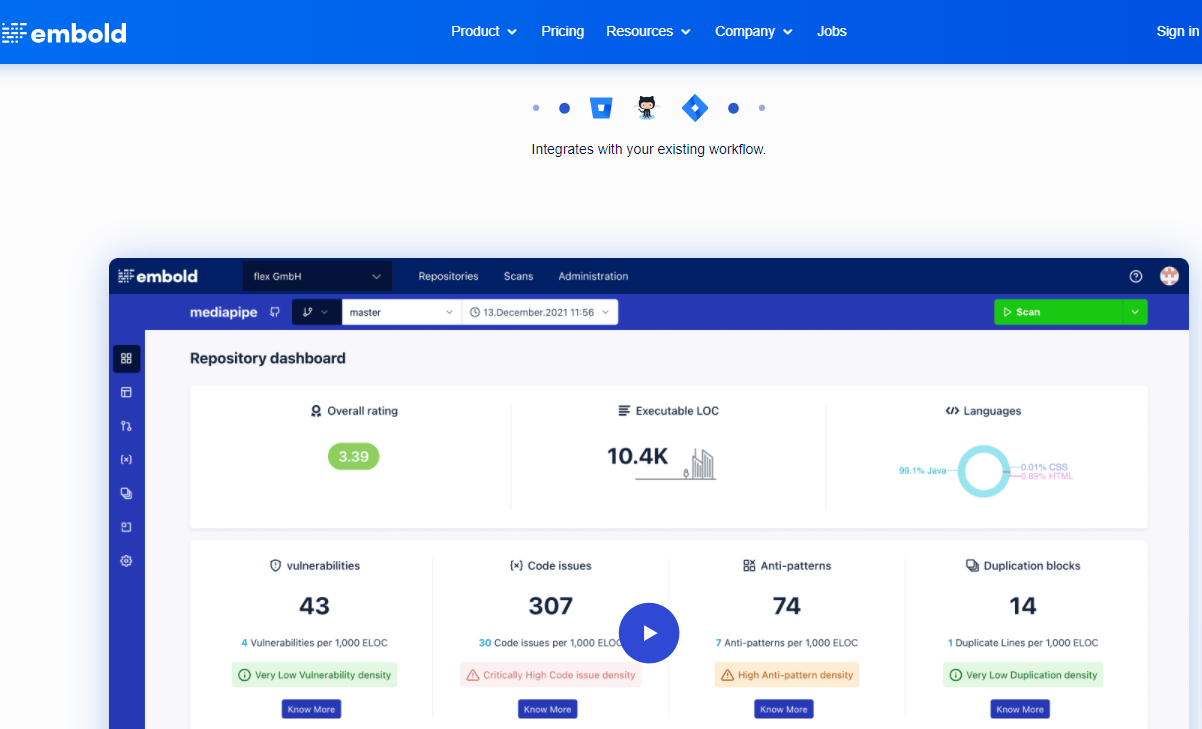
Embold is a static code analysis platform that scans a codebase for vulnerabilities, anti-patterns, and design-level code smells rather than just surface-level style violations. It connects to GitHub, GitLab, and Jira, and it works across multiple languages rather than being tied to a single ecosystem, which matters for a team running a mixed stack. Embold has since been acquired and is now part of BrowserStack’s testing platform, so a team evaluating it today should expect it bundled into BrowserStack’s broader product line rather than sold as a fully standalone tool the way it was a few years ago.
What sets it apart from a linter is the design-pattern layer: it doesn’t just flag a line of code that violates a style rule, it identifies structural issues, a class with too many responsibilities, a method that’s grown past the point of being testable, that a simple linter has no way of catching. For a team that’s accumulated technical debt over a few years and wants a prioritized list of what to fix first rather than a wall of minor warnings, that structural analysis is the actual value.
2. Linx

Linx is a low-code platform built around integration and automation rather than general application development. Instead of writing custom scripts every time two systems need to talk to each other, a developer builds the workflow visually, connect this API to that database, transform the data, trigger this action, and Linx handles the execution. It supports deployment across cloud, hybrid, and on-premise environments, which matters for a team working with legacy infrastructure that can’t move entirely to the cloud in one step.
The honest pitch for Linx isn’t that it replaces a developer’s judgment. It’s that it removes the repetitive, error-prone parts of integration work, the boilerplate connection code, the retry logic, the data mapping, so a smaller team can maintain more integrations than they could by hand-coding each one. For a dev team already stretched across product work, that time saved on integration maintenance is often worth more than any single feature on the comparison page.
Also read: 15 Web Development Tools for Beginners
3. Trello

Trello’s board-and-card model is still one of the fastest ways to get a small team’s task tracking off a shared spreadsheet and into something visual. Cards move across columns as work progresses, checklists break a card into smaller steps, and due dates and labels give a manager an at-a-glance read on where a sprint actually stands without asking anyone for a status update. It offers a genuinely usable free tier and paid plans that scale up with more automation and admin controls as a team grows.
Where Trello starts to strain is on larger engineering teams that need deeper reporting, burndown charts, velocity tracking, dependency mapping between tickets, since the board model wasn’t built for that kind of analysis. A team that outgrows Trello usually moves toward a dedicated engineering issue tracker rather than trying to bolt reporting power-ups onto a tool built for general task management. That’s a normal growth path, not a flaw in Trello itself; it’s simply built for a different stage of team size.
4. Apache NetBeans
NetBeans, now maintained as an Apache Software Foundation project, remains a genuinely capable free and open-source IDE with strong support for Java, PHP, HTML5, and JavaScript. Its GUI builder handles form and layout design through drag-and-drop rather than hand-written markup, which still saves real time on desktop Java application work even though most new development has moved toward web and mobile. It runs on Windows, Linux, and macOS, and its plugin ecosystem covers most of the extensions a Java-focused team would need without paying for a commercial IDE license.
It’s worth being direct about where NetBeans fits in 2026: it’s not the default choice for a team building modern JavaScript or Python applications, where editors like VS Code have become the standard. For a team maintaining an existing Java codebase, or one that specifically wants Apache-backed, community-governed tooling rather than a corporate-owned editor, NetBeans is still a solid, actively maintained option rather than a legacy tool nobody updates anymore.
Also read: 8 Best WordPress Themes for Tech Startups in 2026
5. AWS Cloud9
Cloud9 is AWS’s browser-based IDE, letting a developer write, run, and debug code without a local development environment set up at all. It ships pre-configured for common runtimes and integrates directly with the rest of AWS, so a team already running its infrastructure on AWS can spin up a working environment tied to the same account and permissions rather than managing a separate local toolchain. That’s the real appeal: less time lost to “works on my machine” environment drift between team members.
One thing worth knowing before building a workflow around it: AWS closed Cloud9 to new sign-ups in mid-2024, meaning it’s no longer the tool to reach for on a brand-new AWS account. Existing Cloud9 users can continue running it, but a team starting fresh should look at AWS’s newer options for cloud-based development, or a general browser IDE not tied to a single cloud provider, rather than assuming Cloud9 is still open to new customers the way it was when this list first went up.
6. GitHub Copilot
Copilot wasn’t really a category yet when the earlier version of this list was written, and leaving it off a 2026 list of dev team software would miss one of the tools that’s actually changed daily workflow the most. It suggests code completions, whole functions, and test scaffolding directly in the editor based on the surrounding context, and it’s moved well past autocomplete into handling boilerplate, writing first-draft unit tests, and explaining unfamiliar code in a legacy file a new hire has never touched.
The honest caveat that gets left out of most roundups: Copilot writes plausible-looking code, not necessarily correct code, and a team that treats its suggestions as ready to merge without review is asking for subtle bugs that pass a glance but fail under real conditions. Used as a fast first draft that still goes through the same code review process as anything else, it genuinely speeds up the parts of development that were always mechanical, boilerplate, repetitive test cases, standard CRUD scaffolding, freeing reviewer time for the logic that actually needs a human’s judgment.
7. Linear
Linear built its issue tracker specifically for software teams rather than adapting a general project management tool to fit engineering work, and that focus shows in details a generic tracker gets wrong. Keyboard-first navigation means an engineer can triage a backlog without touching the mouse, cycles (Linear’s version of sprints) are built around how engineering teams actually plan work, and its Git integration automatically links commits and pull requests back to the issue they close, so status updates happen as a side effect of normal work instead of requiring someone to update a board by hand.
For a team that’s outgrown Trello’s board model but doesn’t want the configuration overhead of a heavier tool like Jira, Linear tends to be the tool teams land on. It’s opinionated in a way that works well specifically for software teams and less well for a mixed team that also needs to track marketing or design work in the same system, so it’s worth evaluating against your actual team composition rather than assuming an engineering-first tool fits every department.
Matching Tools to Team Size
A three-person startup and a forty-person engineering org need almost entirely different versions of this stack, even though both would technically describe themselves as “a dev team.” A small team’s biggest risk is spending money and setup time on tooling before there’s enough process to justify it, ending up with a Jira-style configuration nobody actually follows because there aren’t enough people yet to need that much structure. Trello, a free NetBeans or VS Code setup, and Copilot cover most of what a team under ten people actually needs, and adding Embold or a dedicated integration tool like Linx usually only pays off once the codebase and the number of external systems it talks to have both grown past what a couple of engineers can hold in their heads.
A mid-size team, roughly ten to fifty engineers, is usually where the shift from Trello to something like Linear starts to make sense, since that’s the point where sprint planning, cross-team dependencies, and reporting to non-engineering stakeholders all start needing more structure than a board of cards provides. It’s also often the point where a code quality tool like Embold earns its cost, since a codebase maintained by more than a handful of people accumulates inconsistent patterns fast, and catching structural problems automatically becomes cheaper than catching them in a six-month refactor project later.
Larger organizations tend to run several of these tools simultaneously across different teams, an integration platform like Linx maintained by a platform team, Linear or a similar tracker for day-to-day engineering work, Copilot rolled out organization-wide as a licensed seat per developer, and a static analysis tool wired directly into the CI pipeline so nothing merges without passing an automated quality gate. The tools don’t change much at that scale; the amount of process and governance wrapped around each one does.
Setting These Tools Up Without Creating Tool Sprawl
The fastest way to waste a quarter’s worth of setup time is adopting all seven of these tools at once because a roundup article listed them together. Each one has its own onboarding curve, its own admin panel, and its own place in a developer’s daily routine, and a team that rolls out three new tools in the same sprint usually ends up with all three half-configured rather than one properly adopted. The better sequence is picking whichever single gap is causing the most actual friction right now, task visibility, code quality, integration maintenance, and fixing that one thing well before moving to the next.
Integration between tools matters more than any individual feature once more than one is in play. Linear’s GitHub integration linking issues to pull requests automatically saves real time compared to manually updating ticket status, and Copilot suggestions inside an editor that’s already connected to the team’s linting and static analysis rules catch more problems before a human reviewer even sees the code. Before adopting a new tool, it’s worth checking specifically whether it integrates with what the team already uses, since a tool that requires manually copying information between systems tends to get abandoned within a month regardless of how good its individual feature set is.
Frequently Asked Questions
Do we need both a code quality tool like Embold and code review by hand?
Yes, and they solve different problems. Automated static analysis catches structural issues and consistency problems at a scale no human reviewer can track across a large codebase, but it doesn’t understand business context or whether a piece of code actually solves the right problem. Automated tools handle the mechanical checks; human review still needs to answer whether the code is solving the right thing in the first place.
Is Trello really not good enough for engineering teams?
It’s good enough for plenty of them, particularly smaller teams or ones where engineering work is a minority of what’s being tracked alongside marketing, sales, or operations tasks. The point isn’t that Trello is bad for engineering; it’s that a tool built for general task tracking eventually shows its limits against one purpose-built for how software teams plan and ship work, and that limit tends to show up somewhere between fifteen and thirty engineers depending on how complex the codebase and release process are.
Should a small team pay for GitHub Copilot from day one?
Most teams find it worth adopting early rather than waiting, since the productivity gain on boilerplate and test scaffolding tends to outweigh the license cost even for a small team, and the review discipline it requires, treating suggestions as a first draft rather than a finished answer, is a habit worth building before the codebase gets large enough for a bad habit to get expensive.
What replaced AWS Cloud9 for teams that can’t sign up anymore?
Teams building fresh on AWS typically move to a local IDE connected to AWS’s toolkits and extensions, or to a browser-based alternative not tied to a single cloud provider. The workflow Cloud9 offered, an environment tied directly to your cloud account with nothing to configure locally, is still achievable through other tooling; it just isn’t a single AWS-branded product available to new sign-ups anymore.
How to Choose Between These Tools
None of these seven tools compete directly with each other, which is worth noticing before building a comparison spreadsheet. Embold and static analysis tools like it sit in the code quality category. Linx solves integration and automation. Trello and Linear both solve task tracking but for different team sizes and needs. NetBeans and Cloud9 are both places to write code, one local and IDE-based, one browser-based and cloud-tied. Copilot sits inside whichever editor a developer already uses rather than replacing it.
The practical approach is to name the actual gap in your current workflow before adding a tool to close it. A team drowning in unreviewed pull requests has a code quality gap Embold or a similar static analysis tool addresses directly. A team whose sprint board has become an unreadable wall of stale cards has outgrown Trello and should look at Linear rather than adding more Trello power-ups. Adding tools speculatively, because a roundup article said they’re popular, tends to produce a stack nobody fully uses rather than one that actually closes a real gap.
The Bottom Line
The best dev team stack in 2026 looks different from the one that made sense even three or four years ago, mostly because AI-assisted coding has moved from an experiment to a default part of the editor for a lot of teams, and issue tracking has split into tools built specifically for engineering workflows rather than adapted general project management software. Embold, Linx, Trello, NetBeans, and Cloud9 all still earn their spot for the specific jobs they’re built for. Copilot and Linear round the list out with the two additions that have made the biggest difference to how dev teams actually work day to day since this list was first put together.
Interesting Reads:
8 Best WordPress Themes for Tech Startups in 2026
Best WordPress Translation Plugins for Multilingual Sites in 2026