The Page Specification We Gate Every Page With
Ask three developers whether a page is finished and you will get three different answers, none of them wrong. One means the design matches. One means the tests pass. One means it is deployed.
None of those is a definition, which is why pages ship without a title, with three h1 elements, with a focus outline someone removed to make a button look tidier, and with a 404 page that returns 200 OK.
What follows is the specification we gate our own pages with. It is not aspirational. Nothing ships until the required items pass, and the check is run in a browser rather than assumed from a passing build. It is published here in full because a standard nobody can read is not a standard.
The item list derives from specification.website, which catalogues web page requirements across ten categories with sources for each. What is added here is the part that makes it operational: a pass or fail rule, a split between what belongs on every page and what belongs on the site once, and the commands to verify it.
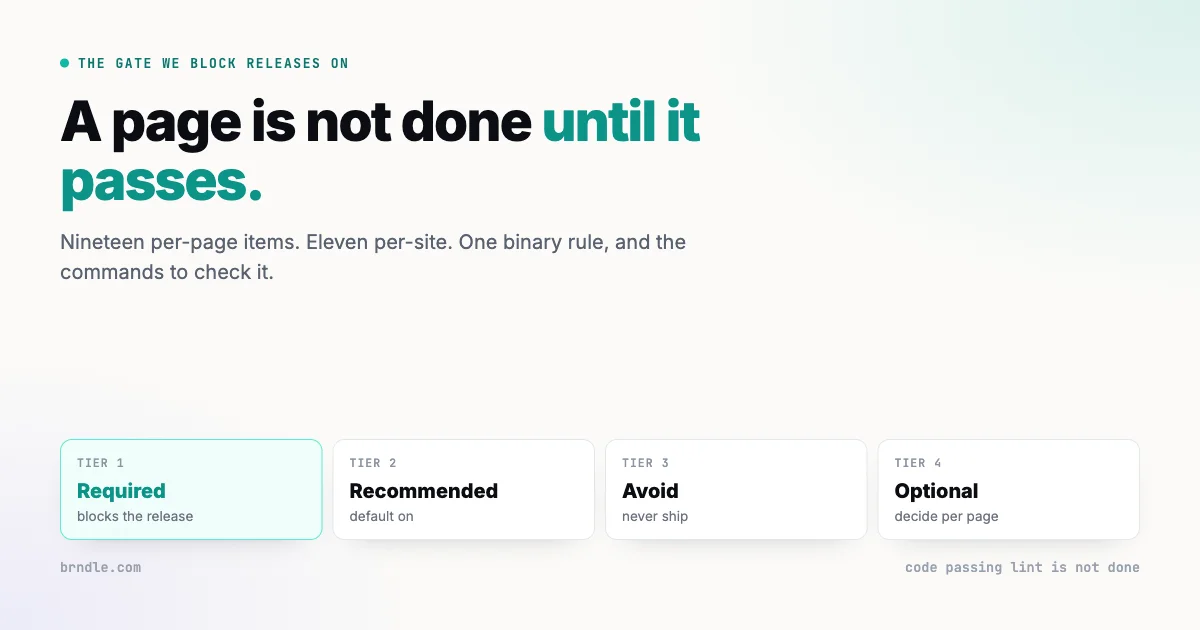
Four tiers, and only one of them blocks
Every item sits in exactly one tier. The tiers are what stop a specification becoming a wish list.
| Tier | Rule |
|---|---|
| Required | The page is not done until every applicable item passes. No exceptions, no “we will do it next sprint”. |
| Recommended | The default-on baseline. Ship it unless there is a stated reason not to, and state the reason. |
| Avoid | Anti-patterns. Never ship these, including when a client asks for one. |
| Optional | Context-dependent. Decide per page and move on. |
The value is entirely in the first row being small enough to actually enforce. A required list of ninety items is a recommended list wearing a costume, because nobody blocks a release on item sixty-three.
The tiering also settles arguments before they start. A disagreement about whether something should ship becomes a disagreement about which tier it belongs in, which is a smaller and more answerable question. Nobody has to relitigate the merits of visible focus indicators on every project.
The required gate, per page
These are set in the page or the template, every time. They are the ones a developer controls directly.
Document foundations
- Exactly one non-empty
<title>, unique per page, 50 to 60 characters, with the distinctive part first and the site name second. Search results and browser tabs both truncate from the right, so a title beginning with the site name wastes the only part anyone reads. <meta charset="utf-8">inside the first 1024 bytes of the head. Past that the browser may have already guessed wrong and started over.<meta name="viewport" content="width=device-width, initial-scale=1">, never disabling user scaling. Blocking zoom is an accessibility failure with no upside.<!doctype html>as the first line, lowercase, so the document is not in quirks mode.<html lang>with a valid BCP-47 tag. Screen readers pick pronunciation from it. Inline passages in another language get their ownlang.
Structure and semantics
- One
<h1>and a nested outline. Never skip a level to get a smaller font, never use a heading for styling. The outline is a navigation structure for anyone not reading visually. - Semantic landmarks:
<header>,<nav>,<main>,<footer>. Real<table>for tabular data with a caption and<th scope>. Real<button>and<a>for interactive controls, not a div with a click handler. - Every
<img>has analtattribute. Descriptive when the image carries meaning,alt=""when it is decorative. Omitting the attribute is different from an empty one, and worse. - Links and buttons have an accessible name. No icon-only control without a label, no empty anchor. Link text describes the destination, which rules out “click here” and “read more”.
Interaction
- Every form control has a programmatically associated
<label>. A placeholder is not a label: it disappears on focus, fails contrast, and is not announced reliably. Errors appear in text, tied to the field, and are announced. - Keyboard operable throughout, in a logical order, with no focus traps.
- A visible focus indicator on every focusable control, high contrast. Never
outline: nonewithout a replacement that is at least as clear. - Colour contrast of at least 4.5:1 for body text, 3:1 for large text and meaningful non-text, checked in both light and dark mode. Dark mode is where this quietly fails.
- Touch targets of at least 24 by 24 CSS pixels, aiming for 44. Our own house rule is a 40 pixel minimum on chips, nav items and buttons.
prefers-reduced-motionrespected. No parallax, autoplay or large motion for people who have asked for less of it.- Captions and transcripts. Video carries synchronised captions, audio-only carries a transcript.
Addressability
<meta name="robots">is correct for what the page is. Public pages index and follow. Staging, admin, thin and private pages carry an explicitnoindex. This is the item where being wrong in either direction is expensive: delisted, or exposed.- The URL is stable. Once published it keeps working. Moving a page ships a 301 or 308; it never silently breaks.
- Error pages return the right status. A 404 page returns 404, not 200. A soft-404 tells crawlers the missing page exists, which is how a site accumulates thousands of indexed nothings. A 500 explains what happened and offers a route forward without leaking internals.
A required list of ninety items is a recommended list wearing a costume. Nobody blocks a release on item sixty-three.
The required gate, per site
These are set once, in the shared layout, the headers file or DNS. The per-page job is to verify they are in place, not to reimplement them.
- HTTPS everywhere, with an HTTP to HTTPS redirect, TLS 1.2 and 1.3 only.
- HSTS with
max-age,includeSubDomainsandpreload. Understand before adding preload that it is effectively irreversible. X-Content-Type-Options: nosniff.frame-ancestorsvia CSP, with X-Frame-Options as the legacy fallback.- Cookie attributes:
Secure,HttpOnlywhere possible, an explicitSameSite, and__Host-or__Secure-prefixes on session cookies. - Consent before any non-essential cookie or storage in the EU and UK. Opt-in, not opt-out.
- A truthful privacy policy, updated in the same change that adds any data collection rather than afterwards.
- Cache-Control:
immutable, max-age=31536000for fingerprinted assets, short or no-cache for HTML. - Compression: brotli where supported, gzip elsewhere, and no re-compression of media that is already compressed.
- Core Web Vitals at p75: LCP at or under 2.5 seconds, INP at or under 200 milliseconds, CLS at or under 0.1.
- Images optimised: WebP or AVIF, sized for the viewport, with explicit width and height so nothing shifts as they load.
The recommended baseline
Ship these unless there is a reason not to, and write the reason down. Grouped as we use them:
- Foundations: canonical URL, meta description, Open Graph and Twitter card, favicons matching the brand, theme-color for light and dark, color-scheme, feed discovery.
- SEO: breadcrumbs, internal linking, clean URL structure, XML sitemap and sitemap index, robots.txt, JSON-LD structured data as a single graph.
- Security: Content-Security-Policy without
unsafe-inlineon script-src, Referrer-Policy, Permissions-Policy, security.txt, subresource integrity on third-party assets, CAA records. - Performance: a font-loading strategy, deferred or module script loading, lazy-loading, resource hints and preconnect, critical CSS, HTTP/3, view transitions, bfcache-friendly pages, scrollbar-gutter.
- Privacy: cookieless analytics that does not store IPs, data minimisation, Global Privacy Control, and vetting every third-party script before it ships.
- Agent-readiness: llms.txt, markdown mirrors of pages, Link headers for alternates, machine-readable formats, structured data aimed at agents, and robots rules that allow AI crawlers, because citation is the point.
- Internationalisation: hreflang,
langon foreign passages, localised metadata, a language switcher the user operates, RTL support, plural rules, locale-aware content. - Resilience: uptime monitoring, a maintenance page returning the correct status, a PWA manifest.
Four things never to ship
The avoid tier is short because it only contains things that are actively harmful rather than merely suboptimal.
Accessibility overlay widgets
The JavaScript widget that promises compliance from a single script tag. They do not deliver it, they frequently interfere with the assistive technology a user has already configured, and they have not prevented litigation. The work they claim to replace is the work in the required gate above, and there is no shortcut through it.
This is the item most likely to be requested by a client who has been sold one. The answer is to show them the gate and explain that the overlay sits on top of the page without fixing anything underneath it.
Empty links and unnamed controls
An icon-only button with no accessible name is an unlabelled control. Screen reader users hear “button” and nothing else. It is a required-gate failure rather than a preference.
Soft-404s
A not-found page returning 200 OK. Every crawler is told the page exists, indexes it, and returns later. On a large site this produces thousands of indexed empty pages and dilutes everything real.
Automatic geographic or Accept-Language redirects
Redirecting people to a locale based on where they appear to be traps anyone travelling, anyone on a VPN, and anyone whose browser language is not the language they read the web in. It also breaks shared links and confuses crawlers, which see one locale and index it as the whole site. Offer the choice, remember it, do not impose it.
Which items apply to which page
Not every required item applies to every page, and pretending otherwise is how a gate gets ignored. A page with no images cannot fail the alt attribute check. A page with no form cannot fail the label check.
The word doing the work in the rule is applicable. A page is not done until every required item that applies to it passes. Deciding applicability is a judgement, and it is the point at which a gate is most often quietly widened, so it is worth being explicit about what does and does not count.
| Page type | Items that rarely apply | Items that always do |
|---|---|---|
| Article or post | Form labels | Title, outline, alt text, contrast, focus, robots, stable URL |
| Landing page | Captions and transcripts, unless it carries video | All foundations, contrast, touch targets, CWV |
| Contact or signup | Heading depth beyond h2 | Every form item, keyboard order, error announcement |
| Documentation | Touch targets on dense tables, within reason | Outline, link text, stable URL, in-page anchors |
| Error page | Canonical, structured data | Correct HTTP status, no leaked internals, a route forward |
Two of those deserve a note because they are commonly waived and should not be.
Error pages get audited least and are seen under the worst conditions. Somebody arriving at a 404 is already having a bad time. That is not the moment for a page that returns the wrong status, offers no navigation, or prints a stack trace.
Documentation pages are where touch targets get waived on the grounds that developers use desktops. A meaningful share of documentation is read on a phone, usually by somebody debugging away from their desk, which is exactly when a 20 pixel link is hardest to hit.
Verification, which is the part that matters
A specification without a check is a document. These run in a few seconds and catch most of the required gate.
# Title present without JavaScript
curl -s "$URL" | grep -i '<title'

# Heading outline: one h1, no skipped levels
curl -s "$URL" | grep -oE '<h[1-6][^>]*>' | head -40

# Images with no alt attribute at all
curl -s "$URL" | grep -oiE '<img[^>]*>' | grep -vi 'alt='

# Security headers and status
curl -sI "$URL" | grep -iE 'strict-transport|x-content-type|content-security|cache-control|^HTTP'

# The 404 actually returns 404
curl -sI "$URL/this-page-does-not-exist" | head -1
Fetching without JavaScript also mirrors how a build-time fetch behaves, which is the failure described in our account of moving this site to Astro and Cloudflare Workers. The first command deserves a note. Fetching without JavaScript is deliberate: it shows what a crawler, a link preview and a slow connection get. A title that only appears after hydration is a title that does not exist for a meaningful share of consumers.
Then the browser, at three widths
The commands cannot see contrast, focus rings, hover states or overflow. Those require a browser at 390, 768 and 1280 pixels, checking:
- A visible focus ring on every link and button, reached by tabbing rather than clicking.
- Hover, focus and visited states on anchors, which themes frequently override in ways the design never accounted for.
- Contrast in light and dark mode. Dark mode is where a palette that passed in light mode quietly fails.
- No horizontal overflow at 390, which is the single most common mobile defect and the easiest to miss on a desktop monitor.
The house rule behind all of it: code passing lint is not done. A page is done when it passes in a browser.
Two failure modes are worth naming because they defeat the browser check itself. Checking focus rings by clicking rather than tabbing shows you a state no keyboard user ever sees, since a click and a tab produce different styling in most browsers. And auditing dark mode by toggling a switch in the site rather than the operating system misses palettes that key off the system preference instead.
The optional item worth adding once the gate is habitual is a set of aria snapshots, captured per page and diffed on change. They catch the outline silently breaking when somebody restructures a template, which is the failure this gate is least likely to catch by eye on a page that still looks right.
Adopting it without stopping work
Applying a gate retroactively to an existing site fails predictably. The audit produces hundreds of failures, the list is too large to act on, and the gate is abandoned within a fortnight.
What works is applying it forward only, then letting the site converge.
- Every new page passes the gate from today. No exceptions, because the exceptions are what kill it. New work is where the standard is cheapest to meet, since nothing has to be undone.
- Fix the per-site items once. Headers, TLS, compression, cache policy. One afternoon, and every page on the site improves at once. This is the highest-value hour in the whole process.
- Any page you touch for another reason gets brought up to the gate while you are in there. A site converges surprisingly fast under this rule, because the pages being edited are the pages that matter.
- Audit the top twenty pages by traffic and fix those deliberately. Everything else waits for rule three.
What this deliberately does not do is schedule a project to fix everything. That project does not get funded, and if it does it competes with work that produces something. Convergence is slower and it actually happens.
One measurement is worth taking at the start: run the verification commands against ten existing pages and record what fails. Not to fix them, but so that in six months there is a baseline showing whether the rule is working. A gate nobody measures becomes a gate nobody applies.
Where this fits against WCAG and Lighthouse
Two questions come up immediately, and both are reasonable.
Is this a substitute for WCAG?
No, and it is not trying to be. WCAG is a conformance standard with legal weight, written to be testable across every kind of content. This is a build-time gate covering the accessibility failures we actually ship, alongside performance, security and metadata concerns that WCAG has no opinion about.
The accessibility items here map onto WCAG success criteria and do not cover all of them. A page passing this gate is considerably more accessible than one that has not been checked at all, and it has not been audited for conformance. If a conformance claim is needed, that is a separate exercise by somebody qualified to make it, and anyone telling you a checklist substitutes for it is selling something.
Does Lighthouse not already do this?
Lighthouse is genuinely useful and it measures a different thing. It scores a page, and a score invites optimisation of the score.
Three specific gaps matter. A perfect accessibility score is achievable on a page with serious accessibility problems, because most of what matters cannot be detected automatically: whether alt text is accurate, whether the heading outline is meaningful, whether link text makes sense out of context. Lighthouse checks the attribute exists. It cannot check the attribute is true.
Rendering differences between engines matter here too, of the kind covered in why small logos look different in Chrome, which no score reports at all. Second, a score is a gradient and a gate is binary. Ninety-four out of a hundred is a good score and tells you nothing about whether the missing six points were the robots tag.
Third, several required items here are outside its scope entirely: whether the URL will still work next year, whether the privacy policy matches what the page collects, whether the noindex is correct for what this page is.
Use both. Run Lighthouse for the measurements it does well, particularly the performance ones, and walk the gate for the judgements it cannot make.
Keeping a specification honest
One discipline stops a document like this decaying into something nobody consults.
When a site gains a capability, that capability should already be described here. If a site ships a new header, a new well-known file, a new agent-discovery surface or a new content endpoint, it must map to a recommended item. If it does not map to one, there are only two possibilities, and both need action: either something non-standard is being shipped and should be reconsidered, or the specification has a gap and needs the item added.
That rule is what keeps the document a description of practice rather than a description of intentions. It also means the specification grows from real work rather than from reading, which is the only way it stays short enough to enforce.
The required gate above is nineteen per-page items and eleven per-site ones. That is small enough to walk before a release and large enough that walking it catches the things that actually break. Anything that cannot survive that test does not belong in the required tier, and moving it to recommended is not a defeat.