A Client-Multisite Workflow with Brndle: One Admin-Panel Config, Many Sites
Key takeaways
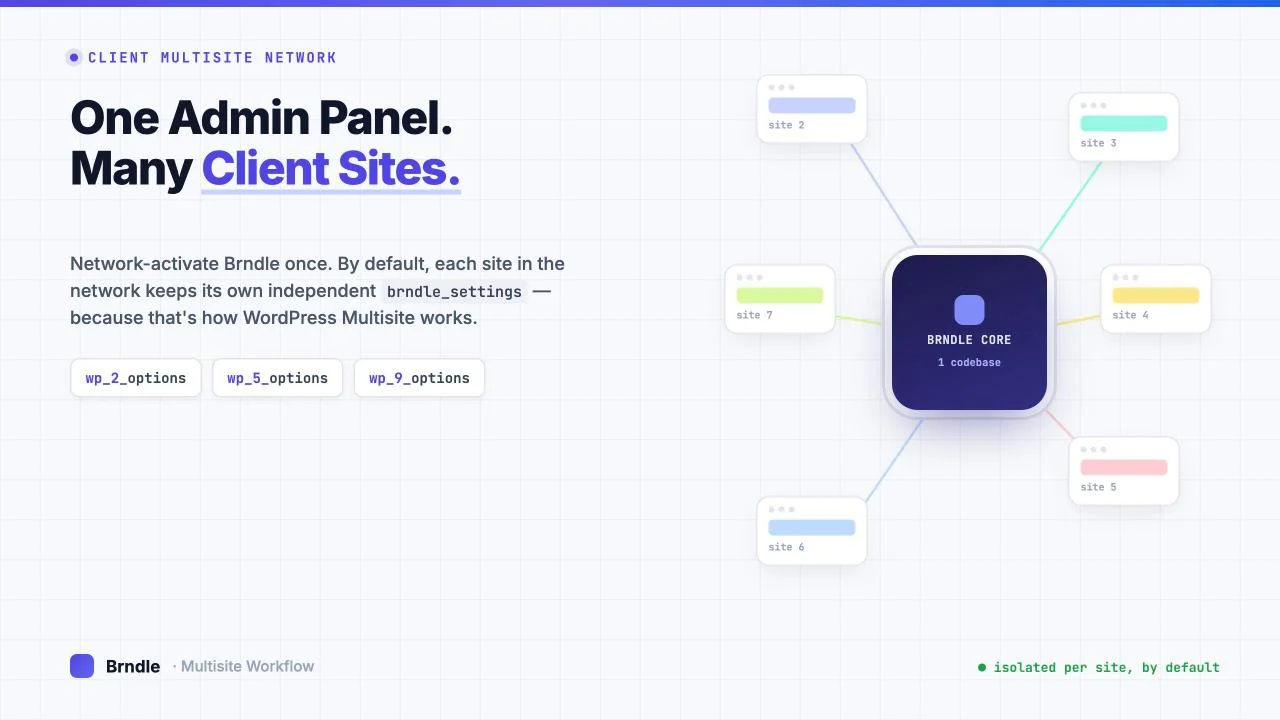
- WordPress Multisite is one install, one codebase, one database engine, many sites. That is a different architecture from running Brndle on ten separate WordPress installs, and it changes what “one config, many sites” actually means.
- By default, every site in a network keeps its own independent copy of every plugin and theme option, including Brndle’s. Multisite does not pool options across sites unless code explicitly asks it to with
get_site_option()orswitch_to_blog(). - We read Brndle’s actual source (
app/Settings/Settings.php,app/Providers/SettingsServiceProvider.php) end to end. There is not a singleis_multisite()check, network admin page, orswitch_to_blog()call anywhere in the theme. Brndle inherits standard WordPress Multisite behavior and adds nothing network-aware on top of it. - That is not a bug. Most themes, Brndle included, have no business opinion on network administration. It does mean an agency running a client network has two real choices: configure each site’s Brndle settings by hand, or script the sync over the REST API Brndle already ships.
- Because WordPress Multisite shares one user table across the whole network, a single REST credential can authenticate against every site’s Brndle settings endpoint. That is a genuine advantage multisite has over templating across separate installs.
A line that shows up constantly in Brndle’s own positioning is “managing multiple client sites.” Most people who read that picture an agency running ten or twenty separate WordPress installs, each with its own database, its own wp-config.php, its own hosting account. That is a real and common setup, and a companion piece on this site, “Import/Export Site Settings via the REST API: A Multi-Client Rollout Script,” walks through templating a Brndle config across exactly that kind of fleet.
This post is about the other shape entirely: WordPress Multisite. One WordPress install, one database, one copy of Brndle’s code on disk, and ten or twenty sites living inside it as rows in wp_blogs. If you run a network like this, “one admin-panel config, many sites” is not a scripting convenience, it is a question about how Multisite itself handles theme settings, and whether Brndle does anything special for it. We went and checked, instead of assuming.
In this guide
- How WordPress Multisite actually handles theme settings
- What Brndle does, and does not, add on top of that
- Workflow one: configure each site by hand
- Workflow two: script the sync over the REST API
- A worked scenario: an agency with a 10-site network
- FAQs
- The short version
How WordPress Multisite actually handles theme settings
Before asking what Brndle does for a client network, it is worth being precise about what WordPress Multisite does on its own, because this is where most of the confusion starts. People hear “network” and assume shared configuration. WordPress Multisite does not work that way for content or settings.
The official Multisite documentation on developer.wordpress.org is direct about the split: “the content in a Multisite has its own unique tables in the database, only the user table is shared between the instances.” Every site in the network gets its own set of content tables, created with a numeric prefix: wp_2_options, wp_2_posts, wp_3_options, wp_3_posts, and so on for each site ID. The main site keeps the un-prefixed wp_options, wp_posts, etc. Only the user record itself, the wp_users table and the user metadata that rides with it in wp_usermeta, is shared network-wide. We will come back to why that one detail matters a lot for scripting.
That table-per-site split is the whole story for theme settings. Any plugin or theme that calls the standard options functions, get_option() and update_option(), is reading and writing against whichever site’s options table is currently active. WordPress resolves “currently active” from the request: which domain or subdirectory the visitor hit, which site that maps to, and which table prefix that site uses. A call to get_option( 'my_setting' ) on site 2 reads wp_2_options. The identical call on site 5 reads wp_5_options. They are not the same row, they are not the same table, and nothing links them automatically.
WordPress does have a separate, genuinely network-wide options layer, but it is a different API on purpose. The Options API reference describes it this way: the _site_ functions, meaning get_site_option(), update_site_option() and delete_site_option(), “are essentially the same as their counterparts. The only differences occur for WP Multisite, when the options apply network-wide and the data is stored in the wp_sitemeta table.” That table is global. A value saved with update_site_option() is visible from every site in the network, because there is only one copy of it.
So the mechanism is simple once you see it laid out: get_option() / update_option() are per-site by construction, and get_site_option() / update_site_option() are network-wide by construction. A theme or plugin author has to deliberately choose the second pair, usually alongside a network admin settings screen, for any setting to behave as “one value for the whole network.” If a theme only ever calls the first pair, which is the normal, default, by-the-book way to store settings, its settings are per-site whether the author thought about Multisite or not. There is a third tool, switch_to_blog( $blog_id ), that temporarily points the per-site functions at a different site’s tables inside the same request. That is how migration scripts and network-wide reports read every site’s individual settings in a loop. It does not change the underlying fact that each site still has its own row.
One more piece of default behavior matters for who can act on any of this: network administration. A Super Admin account, the role that only exists in a Multisite network, can open any site’s wp-admin from My Sites and operates there with the same administrative capabilities a local site admin would have, without needing to be added as a user on that specific site first. That is what makes “manage every site centrally” practical at all in a network of any size, and it is the capability a client-sites workflow will lean on in both of the workflows below.
What Brndle does, and does not, add on top of that
Theme-level Multisite awareness is optional, and most themes skip it, because most themes have nothing network-wide to say. We checked whether Brndle is one of the exceptions by reading its public source rather than guessing from the README. We cloned the brndle-themes/brndle repository and searched the entire codebase, PHP and JS, for every function WordPress core gives a theme to opt into network-aware behavior: is_multisite(), is_network_admin(), switch_to_blog(), get_network_option()/get_site_option(), network_admin_menu, and any registration of a Network Settings screen.
The search came back empty. Zero hits, across the whole theme. Brndle has no network admin page, no network-wide settings store, and no code path that behaves differently when it detects it is running inside a Multisite network versus a single-site install. That is a confirmed fact about the current source, not an inference from the marketing copy, and it is worth saying plainly: Brndle is not Multisite-aware. It just runs on top of whatever WordPress Multisite gives it, same as it would on a single-site install.
Reading how Brndle actually stores its settings shows exactly what that means in practice. All of Brndle’s admin-panel configuration, every color scheme, font pair, header style, and layout toggle, lives in one option, defined in app/Settings/Settings.php:
class Settings
{
    /**
     * WordPress option key where all settings are stored as JSON.
     */
    public const OPTION_KEY = 'brndle_settings';
    ...
    public static function all(): array
    {
        if (self::$cache !== null) {
            return self::$cache;
        }

        $saved = get_option(self::OPTION_KEY, []);
        ...
    }
}
One option key, brndle_settings, holding one JSON blob, read and written with the plain get_option() / update_option() pair we covered above. No get_site_option(), no network fallback, no attempt to check whether a network-wide default exists before falling back to the per-site value. The admin settings page itself, registered in app/Providers/SettingsServiceProvider.php, is a normal add_menu_page() call under admin_menu, which puts it on every individual site’s admin sidebar, not under network_admin_menu, which is the hook a theme would use to put a settings screen in Network Admin instead.
The theme’s REST layer follows the same pattern. Brndle registers a small set of routes under its own namespace:
$namespace = 'brndle/v1';

register_rest_route($namespace, '/settings', [ ... GET, POST, DELETE ... ]);
register_rest_route($namespace, '/settings/export', [
    'methods'             => 'GET',
    'callback'            => [$this, 'handleExportSettings'],
    'permission_callback' => [$this, 'checkManageOptions'],
]);
register_rest_route($namespace, '/settings/import', [
    'methods'             => 'POST',
    'callback'            => [$this, 'handleImportSettings'],
    'permission_callback' => [$this, 'checkManageOptions'],
]);
register_rest_route($namespace, '/cache/purge', [ ... ]);
Every one of those routes is gated by checkManageOptions(), which is nothing more than current_user_can( 'manage_options' ). There is no network-level permission check layered on top, and there does not need to be: in a Multisite network, register_rest_route() runs once per theme boot, so it registers identically on every site. A request to https://client-two.example.com/wp-json/brndle/v1/settings and a request to https://client-five.example.com/wp-json/brndle/v1/settings are handled by the same PHP code, but WordPress resolves them against two different sites’ option tables before that code ever runs, exactly the way it resolves two different sites’ get_option() calls. The export endpoint literally just returns Settings::all(), which is the current site’s settings and nothing else. There is no “give me every site’s settings” endpoint, because that is not a thing Multisite’s default architecture, or Brndle’s code, provides.
None of this is a criticism of the theme. A hub-and-spoke network settings page is real engineering work, it is a feature very few theme authors build because very few of their users run large client networks, and Brndle not having it puts it in the same category as essentially every other free WordPress theme. What matters is that you plan around the real behavior instead of an assumed one. Network-activating Brndle once gives every site in the network access to the theme’s code, its blocks, its templates, and its settings page. It does not give every site the same settings. Each site starts from Brndle’s defaults and accumulates its own independent configuration the first time someone saves that site’s settings screen.
Workflow one: configure each site by hand
Given the mechanics above, the baseline workflow for a client network is the one WordPress hands you for free: network-activate Brndle, then visit each site’s own Brndle settings screen and configure it.
- Network Admin > Themes. Network Activate Brndle once. This makes the theme available to every site in the network; it does not touch any site’s content or options tables.
- My Sites > [client site] > Dashboard. As a Super Admin, switch into the specific client site. You land in that site’s own wp-admin with full administrative capability there, no separate login or role assignment needed.
- Appearance, or the “Brndle” menu item > Brndle Settings. This opens the settings page, a React app that mounts into a single root div Brndle’s admin page renders, backed by the
brndle/v1/settingsREST route under the hood. Set that client’s palette, font pair, header style, and the rest. - Save. The save handler allowlists the submitted keys against Brndle’s known defaults, sanitizes every value, and writes the result to that site’s
brndle_settingsoption. It affects only the site you are currently in. - Repeat per site. There is no step that propagates the choice anywhere else, because nothing in Multisite or in Brndle expects it to.
This is the right call when client sites are genuinely different from each other, which is the common case in agency work: different brand colors, different header style, different font pairing depending on the client’s industry. Multisite’s per-site isolation is doing you a favor here. A furniture retailer and a law firm sharing a network should not share a settings row, and WordPress’s default architecture guarantees they will not by accident.
Where this workflow gets painful is scale and drift. Ten sites with ten slightly different settings panels is fine. Thirty sites where half of them are supposed to share a baseline brand kit, with just a logo and an accent color swapped per client, is thirty manual passes through the same settings screen, and thirty chances for someone to fat-finger a font pair or skip the dark-mode toggle on one site. That is the case the second workflow is for.
Workflow two: script the sync over the REST API
Brndle already ships the three REST routes a sync script needs: GET /wp-json/brndle/v1/settings/export to pull a site’s current configuration as JSON, and POST /wp-json/brndle/v1/settings/import to push a configuration into a site, which runs the same key-allowlisting and sanitization as a normal save. Nothing about those two endpoints is Multisite-specific; they are the same routes a single-site install would use to back up and restore its own settings. What changes in a network is how you authenticate against many sites at once, and that is where Multisite genuinely has an edge over a fleet of separate installs.
Recall the one shared table from earlier: wp_users, and the user metadata in wp_usermeta that travels with it, including Application Passwords, which WordPress stores as user meta. Because that table is global across the whole network rather than duplicated per site, a single Application Password generated once, on any one site, for a Super Admin account authenticates against every site’s REST API in the network. You are not managing twenty separate sets of API credentials the way you would across twenty separate WordPress installs, each with its own wp_users table and its own unrelated admin accounts. You generate the credential once and point it at each site’s URL in turn.
A minimal sync script is three steps per target site: authenticate with the shared credential, GET the export from a known-good “template” site, POST the import to each target. In outline:
// 1. Pull the template config from a reference site once.
$template = wp_remote_get('https://hub.example.com/wp-json/brndle/v1/settings/export', [
    'headers' => ['Authorization' => 'Basic ' . base64_encode("$user:$app_password")],
]);
$config = json_decode(wp_remote_retrieve_body($template), true);

// 2. Push it to every client site in the network.
foreach ($client_site_urls as $site_url) {
    wp_remote_post("$site_url/wp-json/brndle/v1/settings/import", [
        'headers' => [
            'Authorization' => 'Basic ' . base64_encode("$user:$app_password"),
            'Content-Type'  => 'application/json',
        ],
        'body' => wp_json_encode($config),
    ]);
}
That is the same shape as the export and import calls in the sibling post on templating Brndle across separate installs, and that similarity is the point: the REST contract does not know or care whether the two sites it is talking to share a database or not. What differs in a network is everything upstream of that loop. You do not need a password manager row per client install. You do not need to worry about one client’s WordPress version drifting from another’s and breaking the REST route’s shape, because there is exactly one copy of Brndle’s code running the identical route for every site. And because checkManageOptions() is a straight capability check, your Super Admin credential passes it on every site in the network without any extra provisioning step.
Two things this script will not do for you, because nothing in Brndle’s code does them. It will not detect that two sites’ settings have diverged and warn you; you decide which site is the source of truth. And it does not batch multiple sites in one request, because Brndle’s export and import routes operate on exactly one site per call, the one the request resolves to. A loop over your site list, one call per site, is the correct shape, not a missing feature.
A worked scenario: an agency with a 10-site network
Say an agency runs a single Multisite network for ten small business clients: a dentist, a landscaper, two law firms, a bakery, and five others. All ten use Brndle. Six of them share the agency’s standard “clean professional” brand kit with only a logo and accent color swapped. Four, including both law firms, wanted a fully custom look.
The rollout looks like this. Network Activate Brndle once from Network Admin. Build the shared brand kit on one site, call it the hub, get the palette, font pair, and header style signed off by the agency’s design lead there first. Export that site’s settings with the REST route. Loop the import call across the five other “standard kit” sites. On each of those five, log in once as Super Admin, swap just the logo and, if the client’s brand color is not already one of Brndle’s presets, register it as an extra scheme through the brndle/color_presets filter before importing, so the accent-color field in the imported JSON actually resolves to something real on that site.
The four custom sites, including the two law firms, get the manual workflow: Super Admin switches into each site individually and configures it from a blank slate in the Brndle Settings screen, because there is no shared starting point worth exporting from for sites that are supposed to look nothing alike. That is not a workaround or a limitation of the tooling. It is the correct call given what those four sites actually need, and Multisite’s per-site option isolation means configuring one of them carries zero risk of bleeding into the other nine. If one of those law firms later needs logins, member profiles, or a client portal, that is the point where a Brndle site outgrows a marketing-site theme entirely, network or not.
Six months later, when the agency’s design lead decides the shared brand kit’s header style should change network-wide, the fix is one settings change on the hub site, one export, and a five-site import loop, a few minutes of scripted work. Doing the equivalent update across five separate WordPress installs with five separate admin logins would be the same five edits, just without the shared user table making the credential story trivial, and without the guarantee that all five sites are running the exact same copy of Brndle’s REST contract.
FAQs
Does network-activating Brndle apply its settings to every site automatically?
No. Network Activate makes the theme’s code available to every site in the network. Each site still starts from Brndle’s defaults and keeps its own independent brndle_settings option, the same as it would if you activated the theme separately on each one.
Does Brndle have a Network Admin settings page?
No. We checked the theme’s public source for a network admin menu registration, is_multisite() checks, and any network-wide settings store, and found none. Brndle’s settings page is registered per-site under the normal admin_menu hook, visible from each site’s own wp-admin.
If I change Brndle’s settings on the main site, does it change on the subsites?
No. The main site’s settings live in the un-prefixed wp_options table; every subsite has its own numbered options table, such as wp_2_options. They do not reference each other.
Can a Super Admin configure a subsite’s Brndle settings without being added as a user there?
Yes. Switching into any site from My Sites gives a Super Admin administrative capability on that site, which is what makes centrally managing a client network practical without maintaining a separate user list per site.
Can one REST credential really authenticate against every site in the network?
Yes, for the reason covered above: WordPress Multisite shares one wp_users table and its associated user metadata, including Application Passwords, across the whole network. A credential generated once is valid everywhere the account has permission, which for a Super Admin is every site.
Is this the same as the REST script for syncing Brndle across separate client installs?
The REST calls themselves, export then import, are the same shape, because the routes do not know whether the two sites share a database. What differs is the credential and provisioning story: one shared user table in a network, versus separate logins and separate Application Passwords per install when the sites are not in the same Multisite network.
Will Brndle ever add a network settings page?
We cannot speak for the project’s roadmap. As of the source we read, there is no such page, and nothing in the architecture of a free, single-maintainer theme targeting individual sites suggests it is a priority. If that changes, it would show up as a network_admin_menu registration and a get_site_option()-backed default, which is a reasonable thing to grep for in a future release. The same GPL-2.0, no-license-check model that makes Brndle’s long-term client risk manageable for a single site applies the same way across a network: nothing a network admin configures can be revoked by a licensing change.
What happens if I import a settings JSON that references a color scheme the target site doesn’t have?
Brndle’s import handler allowlists incoming keys against its known defaults and sanitizes every value before saving, but it cannot invent a color scheme that was never registered on the target site. Register any custom scheme through the brndle/color_presets filter on the target site before importing a config that references it.
Do I need to be careful about which user runs the sync script?
Yes. Every settings route is gated by current_user_can( 'manage_options' ). Run the script as a Super Admin, or as a user explicitly granted admin on every target site; anything less and the import calls will fail permission checks on sites the account was not added to.
Does purging Brndle’s cache need to happen per site too?
Yes. The /cache/purge route is a per-site REST call, same as settings import and export, and it is worth calling after an import so compiled views pick up the new settings immediately instead of on the next natural cache expiry.
The short version
WordPress Multisite gives every site in a network its own independent copy of every option by default, theme settings included, and shares only the user table. Brndle does not add any network-aware code on top of that: no network admin page, no network-wide settings store, nothing that treats a Multisite network differently from a single site. That is not a gap, it is the normal, unopinionated shape most themes take, and Brndle’s own REST routes for export, import, and settings give you everything you need to either configure each client site by hand or script a sync across them. The one real advantage a network has over a fleet of separate installs is the shared user table: one credential, generated once, that works everywhere. Use it.
Source note: Multisite table and options-API facts are quoted from developer.wordpress.org’s Multisite documentation and Options API reference, read 12 November 2026. Brndle’s settings storage, REST routes, and the absence of Multisite-specific code are confirmed by reading the theme’s public source at github.com/brndle-themes/brndle (files referenced: app/Settings/Settings.php, app/Providers/SettingsServiceProvider.php), cloned the same day. The worked scenario is illustrative, not a real client network.