Atomic Design in a WordPress Block Theme: From Tokens to Templates
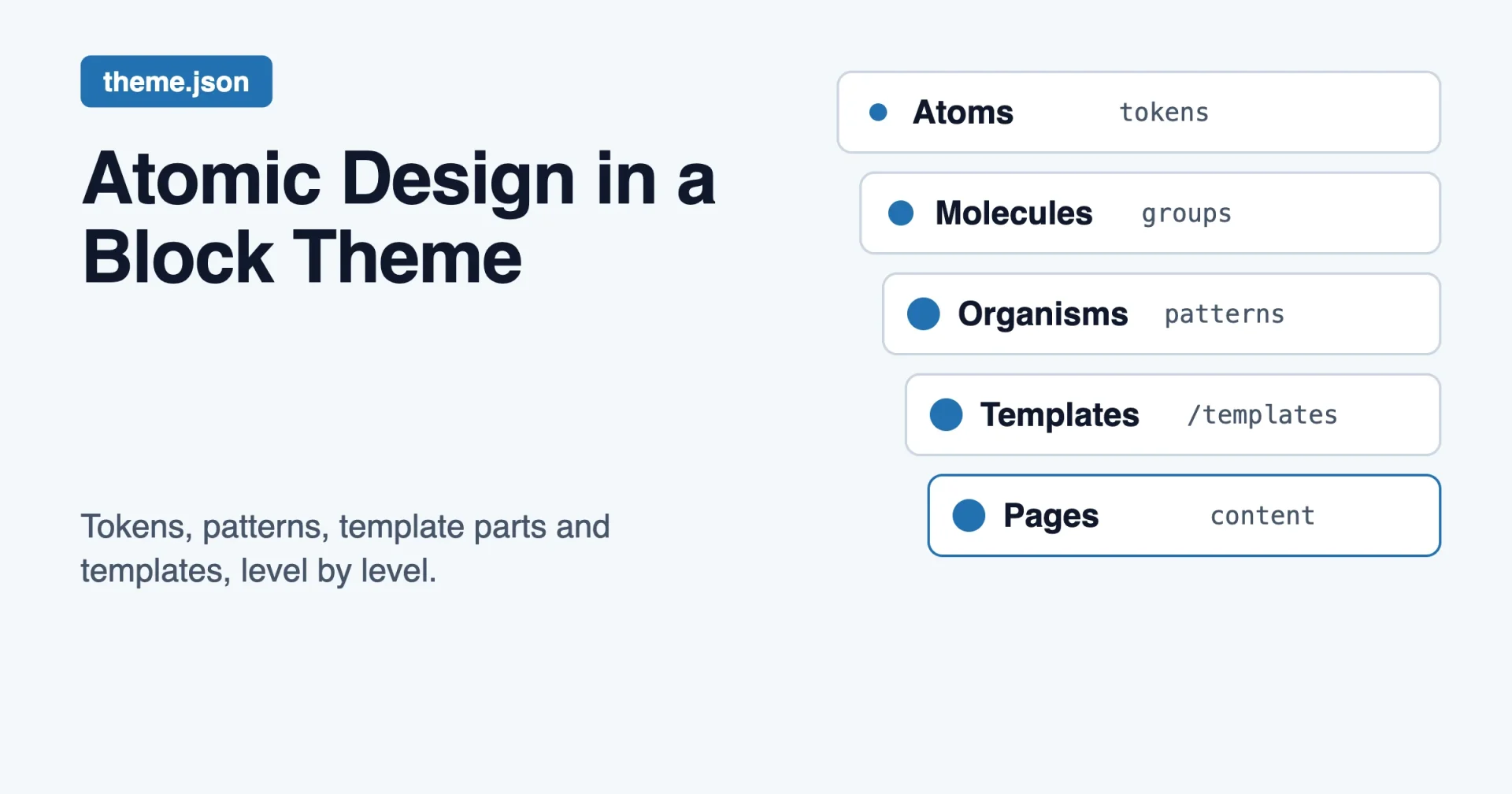
Short answer: an atomic design system maps onto a WordPress block theme cleanly if you treat each of Brad Frost’s five levels as a place where WordPress already keeps something. Atoms are your theme.json tokens and the core blocks styled by them. Molecules are small block groups and block styles. Organisms are patterns and template parts. Templates are the files in the templates folder. Pages are the real posts and pages you build from them.
If you already know the model, the useful part starts at the mapping table below. If you do not, the first section explains it in plain words.
What atomic design actually says
An atomic design system is a way to organize an interface, written down by Brad Frost in his book Atomic Design (2016). The methodology chapter is free to read on his site at atomicdesign.bradfrost.com. He borrows the idea from chemistry. Everything is made of atoms, atoms join into molecules, and molecules join into larger structures.
He names five levels. Here they are in his own words where his wording is short enough to quote.
- Atoms are the base elements of an interface, such as form labels, inputs and buttons. He writes that they are “the foundational building blocks that comprise all our user interfaces.”
- Molecules are small groups of atoms that work as one unit. His example is a search form made of a label, an input and a button. He calls them “relatively simple groups of UI elements functioning together as a unit.”
- Organisms are bigger sections built from molecules, atoms or other organisms. A site header is his example. He describes them as “relatively complex UI components composed of groups of molecules and/or atoms and/or other organisms.”
- Templates are page-level layouts. In his words, they are “page-level objects that place components into a layout and articulate the design’s underlying content structure.”
- Pages are templates filled with real content. He calls them “specific instances of templates that show what a UI looks like with real representative content in place.”
Two points from that chapter matter for what follows.
First, templates and pages are different on purpose. A template cares about the shape of content: how long a title can be, what size an image is. A page shows real content in that shape, and real content breaks things. A cart with one item looks fine. A cart with ten items shows you whether the design holds. Frost says pages are where you test the system and then go back to fix the molecules, organisms and templates.
Second, he does not treat the five levels as a strict ladder. He says atomic design is “not rigid dogma” and that it is a mental model for seeing an interface as a whole and as a set of parts. He also says teams can rename the stages to suit their organization. That permission matters here, because WordPress already has its own names for these things.
One thing the book does not include is a layer below atoms. Many teams add one, called design tokens: the named values (colors, spacing, type sizes) that atoms are made from. Frost’s model starts at atoms, so tokens are our addition, and in a block theme they are the most important layer. Keep that in mind, because I will treat tokens as “level zero” and say so each time.
Why block themes fit this model better than old themes
A classic PHP theme mixes every level into the same files. header.php holds an organism. single.php holds a template. A hard-coded hex value sits inside a stylesheet two folders away, and a button’s padding is repeated in four places. You can still do atomic design there, but you have to build the discipline yourself.
A block theme gives each level a separate home, and the editor shows them to the person using the site:
- Design decisions live in one JSON file,
theme.json. - Reusable arrangements of blocks live in a
patternsfolder. - Site-wide regions such as the header live in a
partsfolder. - Page layouts live in a
templatesfolder. - Real content lives in the database, as posts and pages.
That is five places for five levels, plus the tokens. The mapping is almost one to one.
If you want the wider tour of what a block theme can borrow from big design systems, I covered that in Design System Examples Worth Studying, and What a WordPress Block Theme Can Borrow. This post is narrower. It takes one model and fits it to the WordPress file structure.
The atomic design system mapping at a glance
| Atomic level | Where it lives in a block theme | What you author |
|---|---|---|
| Tokens (level zero, not in the book) | theme.json settings and presets | Colors, type sizes, spacing sizes, custom values |
| Atoms | Core blocks styled through theme.json styles | Button, heading, paragraph, image, separator |
| Molecules | Block groups, block styles, small patterns | Icon plus text, search form, author line |
| Organisms | Patterns and template parts in parts | Header, footer, hero, pricing table, FAQ |
| Templates | Files in templates | Single post, archive, 404, page |
| Pages | Posts and pages in the database | The real content, with real lengths and images |
Now each row in detail, with code.
Level zero: tokens in theme.json
Frost’s book begins at atoms. In a WordPress theme, though, an atom like a button has no meaning until it has a color, a radius and a padding, and those values need a home. That home is theme.json.
The file has two top-level jobs. settings decides what the editor offers. styles decides how things look by default. The handbook shows the settings section as a group of objects for color, spacing, typography and more, plus a custom object that it describes as “an object for adding custom settings, which are output as CSS custom properties.”
Here is a small token set. It is not Brndle’s. It is the shape any theme would use.
{
  "$schema": "https://schemas.wp.org/trunk/theme.json",
  "version": 3,
  "settings": {
    "color": {
      "palette": [
        { "slug": "base", "name": "Base", "color": "#ffffff" },
        { "slug": "contrast", "name": "Contrast", "color": "#111827" },
        { "slug": "primary", "name": "Primary", "color": "#2563eb" }
      ]
    },
    "spacing": {
      "spacingSizes": [
        { "slug": "20", "name": "Small", "size": "0.5rem" },
        { "slug": "40", "name": "Medium", "size": "1rem" },
        { "slug": "60", "name": "Large", "size": "2rem" }
      ]
    },
    "custom": {
      "radius": { "card": "0.75rem" }
    }
  }
}
WordPress turns each preset into a CSS custom property. The handbook gives the pattern as --wp--preset--{type}--{slug}. So the palette above produces --wp--preset--color--base, --wp--preset--color--contrast and --wp--preset--color--primary. The spacing sizes produce --wp--preset--spacing--20, --wp--preset--spacing--40 and --wp--preset--spacing--60. Color presets also produce utility classes such as .has-contrast-color and .has-contrast-background-color, which is how a block picks up a palette color.
Custom values follow a similar naming idea. A custom entry becomes a variable under --wp--custom--, with nested keys joined by double hyphens, so radius.card becomes --wp--custom--radius--card.
The example uses "version": 3. I could not confirm the current version number on the handbook pages I read, and the settings page there still shows "version": 2 in its sample. Check the theme.json reference for the version your minimum WordPress release supports before you copy it.
Why call this level zero and not part of the atoms? Because tokens carry no markup. They are only decisions. A good test is whether you can delete every template in your theme and still have a design system. With tokens you can: the palette, scale and radius still exist. That is the same idea behind my earlier post on why design tokens should outlive your CSS framework.
Atoms: core blocks, styled once
An atom in Frost’s model is a label, an input or a button. In a block theme the closest match is a core block with no children: a paragraph, a heading, an image, a separator, a button.
You do not write markup for these atoms. You style them. The styles section of theme.json lets you set a default look for every instance. Here is the idea in a minimal form:
{
  "styles": {
    "color": {
      "background": "var(--wp--preset--color--base)",
      "text": "var(--wp--preset--color--contrast)"
    },
    "elements": {
      "button": {
        "color": {
          "background": "var(--wp--preset--color--primary)",
          "text": "var(--wp--preset--color--base)"
        },
        "border": { "radius": "var(--wp--custom--radius--card)" },
        "spacing": {
          "padding": {
            "top": "var(--wp--preset--spacing--20)",
            "bottom": "var(--wp--preset--spacing--20)",
            "left": "var(--wp--preset--spacing--40)",
            "right": "var(--wp--preset--spacing--40)"
          }
        }
      }
    }
  }
}
Notice that every value points back to a token. There is not one raw hex code in the styles section. That is the rule that makes the whole system work: atoms reference tokens, and nothing else references raw values.
You can also style one specific block under styles.blocks, keyed by the block’s namespace and name, such as core/button. The handbook’s settings page makes the same point for settings.blocks: “you must know both its namespace and slug,” and anything set for the block overrules the global setting. I could not confirm the exact styles.blocks examples on the pages I read, so I am not showing a snippet for it. The settings equivalent is shown in the handbook, and the theme.json reference lists the styles keys.
Molecules: small groups that work as one unit
A molecule is a few atoms that belong together. Frost’s example is a search form. In a block theme, the plain version is a core/group block holding a few blocks, such as an icon, a heading and a short paragraph, or an author avatar next to a name and a date.
There is one practical question: where do you keep molecules? You have three options.
- As a block style on a group. Good when the molecule is mostly styling, such as a card look on a plain group.
- As a small pattern with the Inserter turned off. The pattern header supports
Inserter: false, which the handbook describes as controlling whether the pattern shows in the inserter, defaulting to true. A hidden pattern can still be used inside bigger patterns. This is a clean way to hold a molecule that you only want inside organisms. - As a block you build yourself. Only when the molecule has real behavior or settings that a group of core blocks cannot give you.
Most molecules in a content theme fall under option one or two. Reach for option three late.
Organisms: patterns and template parts
This is where block themes shine, because Frost’s definition of an organism is almost a description of a pattern: “relatively complex UI components composed of groups of molecules and/or atoms and/or other organisms.”
A pattern is a saved arrangement of blocks. In a block theme you register one by adding a PHP file to the patterns folder with a header. The handbook describes the header as “PHP-commented code with a list of key + value pairs at the top of a file,” and shows this minimal example:
<?php
/**
 * Title: Hero
 * Slug: themeslug/hero
 * Categories: featured
 */
?>
<!-- wp:group {"layout":{"type":"constrained"}} -->
<div class="wp-block-group">
  <!-- wp:heading {"level":1} -->
  <h1 class="wp-block-heading">A clear headline</h1>
  <!-- /wp:heading -->
  <!-- wp:buttons -->
  <div class="wp-block-buttons">
    <!-- wp:button -->
    <div class="wp-block-button"><a class="wp-block-button__link wp-element-button">Get started</a></div>
    <!-- /wp:button -->
  </div>
  <!-- /wp:buttons -->
</div>
<!-- /wp:group -->
The handbook says most patterns should have at least Title, Slug and Categories. The slug must be namespaced in the form namespace/pattern-name. Other header keys include Keywords for search, Block Types to tie a pattern to a block, and Inserter.
Site-wide organisms are a different case. A header or footer is not something an editor drops into one page. It belongs on every page. For that WordPress has template parts. The handbook says they go in the theme’s parts folder, with no nested folders, for example parts/header.html and parts/footer.html. A template pulls one in with a single line of markup:
<!-- wp:template-part {"slug":"header","tagName":"header"} /-->WordPress loads parts/header.html for that block, and tagName sets the wrapping element. You can also register parts in theme.json under templateParts, with an area, a name that matches the file name, and a title, so they show up with clear labels in the editor.
Pattern or template part?
People mix these up, so here is a rule that works.
- If the thing appears once per site and everywhere, it is a template part. Change it once, and every page changes.
- If the thing is copied into a page and then edited, it is a pattern. Each use is independent.
A header is a template part. A hero section on a landing page is a pattern. A pricing table is a pattern. A footer is a template part. This rule alone settles most of the arguments.
The longer comparison is in Patterns, Template Parts and Style Variations, and the short version above is enough to build with.
Templates: the layout files
Frost defines templates as page-level layouts that show the structure of content without the real content. A block theme’s templates folder is that, almost literally. The handbook says index.html is the only required file, and that its presence tells WordPress the theme is a block theme. Templates are “composed entirely of block markup,” and they typically contain block markup, template part references and pattern references.
Here is the handbook’s 404 example, which uses the two template parts:
<!-- wp:template-part {"slug":"header","tagName":"header"} /-->
<!-- wp:template-part {"slug":"footer","tagName":"footer"} /-->
A real template adds a main area between them, with blocks such as Post Title, Post Content and Query Loop. Those blocks are placeholders for content that does not exist yet. That is the “underlying content structure” Frost talks about.
A good template does very little. It arranges organisms and tells the content where to go. If a template has dozens of lines of custom styling, the styling probably belongs in an atom, a molecule or a token.
Pages: where the system gets tested
Pages are the part people forget. In Frost’s model, a page is a template with real content. In WordPress that is simply a post or a page that uses the template.
Do not skip this level, because this is where a design system shows its cracks. Frost’s cart example applies directly. Try these tests on a real page in your theme:
- A post title that runs to four lines on a phone.
- A card grid with three items, then with eleven.
- An image with the wrong aspect ratio.
- A button label in German or Finnish, which can be much longer than the English one.
- A page with a right-to-left language.
When one of these breaks, go back up the ladder. If the title wraps badly, the fix may be a token (a smaller size step on mobile). If the card grid breaks, the fix is in the molecule or organism. Fix it at the lowest level that explains the problem, and every page improves. That is the “loop back” Frost describes.
If you build pages with real content early, you find these problems while the theme is still cheap to change.
How Brndle’s tokens and 20 native blocks fit
Brndle is the theme this site is about, and it is a useful test of the model because it is not a plain theme.json theme. It renders blocks with Blade views through Acorn, and its settings live in an options row with a REST endpoint. I wrote the details in One Design System, Four Platforms: How Brndle’s Tokens Survive the Astro/Ghost/Shopify Roadmap, checked against the source on 30 October 2026. This section uses only the facts from that post.
Here is how its parts line up with the five levels.
- Tokens. Brndle keeps 12 color presets, such as
sapphireandindigo, as a plain array, and one stored setting such ascolor_scheme: 'sapphire'picks the active one. A function derives a full light and dark palette from one hex value. Font pairs are stored the same way, as a key such asfont_pair: 'inter'. The result is printed as CSS custom properties in the page head. This is level zero: named decisions with no markup. - Atoms. The type, color and spacing those tokens produce feed the base elements: headings, paragraphs, buttons, links.
- Molecules and organisms. The theme registers 20 native blocks. Several of them are clearly organisms, such as the hero, the stats row, the pricing table, the FAQ and the comparison table. Each one is a Blade view that reads the tokens.
- Templates. Brndle’s page layouts are Blade views, not
.htmlfiles in atemplatesfolder. That is a real difference from a pure block theme. The level is still there. It is just authored in a different language. - Pages. The posts and landing pages you build with the blocks.
Two honest limits apply. First, I did not read Brndle’s current source again for this post, so I am relying on the earlier verified article, and the exact counts (12 presets, 20 blocks) could drift as the theme changes. Second, the post notes that some docblocks and marketing copy lag the source, so check the repository before you quote a count as fact.
The lesson is about the model, not the theme. The levels exist whether your templates are JSON, HTML or Blade. What changes is the file extension. If you are choosing how to build your own theme, pick the language your team can maintain, and keep the token layer in plain data so it can move.
One more link in the chain
The recent WordPress admin work adds a twist. WordPress now has two design systems, one for the admin and one for the front end, and only one of them is theme.json. If you are curious why tokens in your theme do not style the admin screens, WordPress Now Has Two Design Systems, and Only One Is theme.json explains the split. For atomic design on the front end, theme.json is still the source of truth.
Build order for an atomic design system
If you are starting an atomic design system in a theme, or cleaning up a theme that grew without a plan, work from the bottom of the ladder up. Skipping ahead is how themes end up with raw hex codes in six places.
- Write the tokens first. Palette by role, a spacing scale, a type scale, and a short list of custom values such as radius and shadow. Keep the names about roles.
- Style the atoms with tokens only. Buttons, headings, links, form fields, images. Run a search for
#in your styles. Every hit is a token you forgot. - Register a few block styles for the variants you really use. Outline button, card group, narrow separator. Stop when the list reaches what you can name from memory.
- Build organisms as patterns. Hero, feature grid, pricing, FAQ, call to action. Give each a namespaced slug and a category.
- Build the template parts. Header and footer first, then anything else that repeats on every page.
- Compose the templates. Each should be short. If one is long, find out what belongs lower down.
- Test with real pages. Use real titles, long labels, many items, big images and a right-to-left language. Fix problems at the lowest level that explains them.
This order also gives you a natural review list for a pull request. A change at level one affects the whole site, so it needs a careful look. A change at level six affects one layout, so it needs less.
Common mistakes
Three mistakes show up again and again. Raw values in patterns, such as style="color:#2563eb", copy a token that will go stale, so use the palette slug. Header patterns pasted into forty pages leave you forty headers to change, so use a template part. Names based on looks, like big-blue-button, break the day the brand turns green, so name by role.
Frequently asked questions
Is atomic design the same as a design system?
No. Atomic design is a way to organize and name the parts. A design system is the whole set of rules, tokens, components and guidelines your team agrees to follow. Atomic design is one useful way to structure the components inside it.
Do I need Brad Frost’s exact names?
No. The book says teams can rename the stages to suit their organization. Some WordPress teams say “tokens, elements, patterns, parts, templates.” Use whatever your team will remember, as long as everyone uses the same word for the same level.
Where do design tokens go in a WordPress block theme?
In theme.json. Colors go under settings.color.palette, spacing under settings.spacing, and anything else under settings.custom. WordPress turns them into CSS custom properties that follow the --wp--preset--{type}--{slug} pattern, or --wp--custom-- for custom values.
What is the difference between a pattern and a template part?
A template part appears in the same place on many pages, and one edit changes all of them. A pattern is copied into a page, and each copy is edited on its own. Headers and footers are template parts. Hero sections and pricing tables are patterns.
Is a block pattern an organism or a molecule?
It depends on size. A small hidden pattern holding an icon and a line of text is a molecule. A hero or a pricing table is an organism. The size of the pattern, not the file type, decides the level.
Can I use atomic design with a Tailwind theme?
Yes. The levels do not depend on the CSS tool. Tailwind v4 keeps its tokens in an @theme block as CSS variables, which plays the same role as level zero. The idea is the same: one named set of decisions that everything else points to. I wrote about sharing one palette between Tailwind and theme.json in From a Tailwind Theme to theme.json.
The short version
An atomic design system in WordPress is mostly a matter of putting each thing in the folder WordPress already gives it. Start from the book’s five levels, add tokens underneath them, and give each level the folder that WordPress already provides. Tokens go in theme.json. Atoms are core blocks styled by tokens. Molecules are small groups and block styles. Organisms are patterns and template parts. Templates are layout files. Pages are real content that tests all of it.
The model’s value is not in the names. It is in the habit it builds: fix a problem at the lowest level that explains it, and keep raw values out of everything above the tokens. Do that and a theme stays easy to change for a long time.
Source note: the definitions of the five levels and the quoted phrases come from Brad Frost’s book Atomic Design, chapter 2. The file structure, header fields and CSS variable names come from the WordPress Theme Handbook at developer.wordpress.org. Brndle’s counts come from an earlier post on this site, checked against its source on 30 October 2026, and were not re-checked for this article.