Patterns, Template Parts or Style Variations? How to Choose
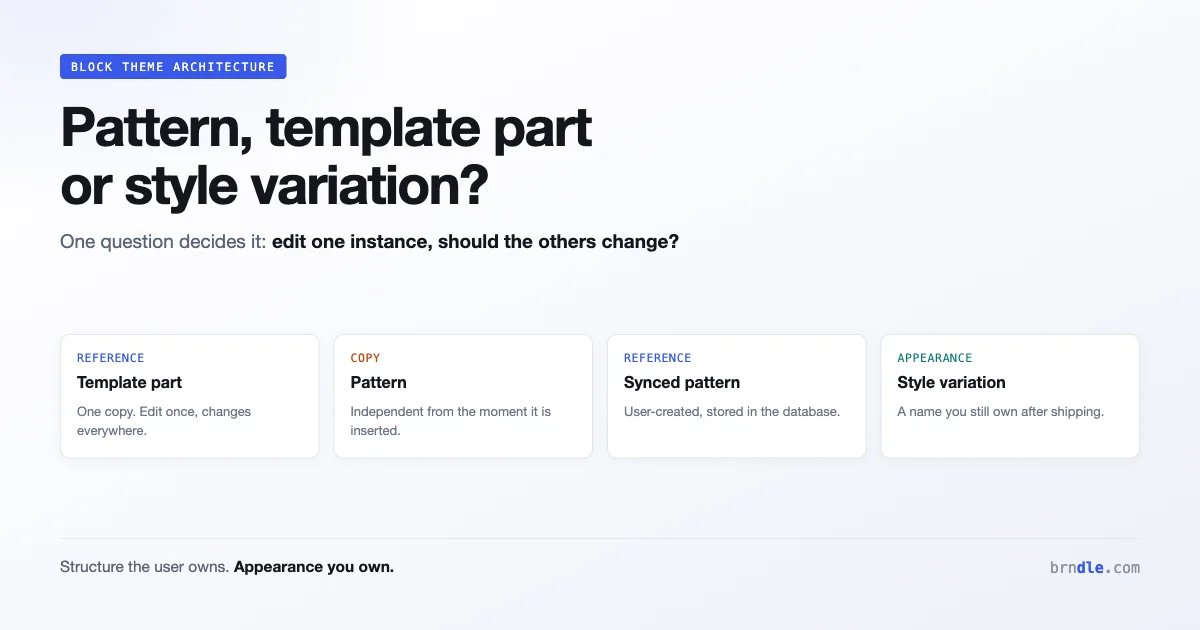
Every block theme reaches the same fork. You have a piece of design that appears in several places, and you have to decide what kind of thing it is: a pattern, a template part, a block style variation, or a synced pattern.
Choose wrong and you get one of two familiar outcomes. Either users cannot change something they reasonably want to change, or they change one instance and are surprised the other eleven did not follow.
The four options are not interchangeable, and the difference is not really technical. It is a question about who owns the thing after you ship it.
The question that decides it
Before comparing features, ask this: when this appears in two places and someone edits one, should the other change?
That single question separates the options cleanly, because it is a question about ownership rather than markup.
| You want | Use | Edit behaviour |
|---|---|---|
| One thing, everywhere, edited once | Template part | Global |
| A starting point users adapt per use | Pattern | Independent copies |
| One thing, everywhere, inside content | Synced pattern | Global |
| A different look for an existing block | Style variation | Per instance, from a fixed set |
Patterns are copies. Template parts and synced patterns are references. Style variations are appearances. Almost every structural mistake in a block theme is one of those three treated as another.
Template parts
A template part is a reusable chunk of a template, stored in parts/ and referenced from templates. Headers and footers are the canonical examples.
parts/
  header.html
  footer.html
  sidebar.html
Declare them in theme.json so the editor knows what they are and where they belong:
{
  "version": 3,
  "templateParts": [
    { "name": "header", "title": "Header", "area": "header" },
    { "name": "footer", "title": "Footer", "area": "footer" },
    { "name": "sidebar", "title": "Sidebar", "area": "uncategorized" }
  ]
}
The area value matters more than it looks. It controls where the part appears in the editor’s interface and which semantic element wraps it: a header area renders inside header, a footer inside footer. Setting it to uncategorized is fine for a genuine miscellaneous part and wrong for anything that is semantically a header or footer.
Use a template part when: the thing is structural, appears across templates, and a user editing it once should see it change everywhere. Site header, site footer, a shared sidebar.
Do not use one when: the thing lives inside post content, or when users will want per-page variations. A template part is a poor fit for anything an author places while writing, because it is not available where they are working.
Patterns
A pattern is a starting point. A user inserts it and gets a copy, which they then edit freely. Changing the pattern in your theme does not change anything already inserted.
Patterns live in patterns/ as PHP files with a header comment:
<?php
/**
 * Title: Call to action, centred
 * Slug: mytheme/cta-centred
 * Categories: call-to-action, featured
 * Description: A centred heading, paragraph and button.
 */
?>
<!-- wp:group {"layout":{"type":"constrained"}} -->
<div class="wp-block-group">
    <!-- wp:heading {"textAlign":"center"} -->
    <h2 class="has-text-align-center">Ready to start?</h2>
    <!-- /wp:heading -->
</div>
<!-- /wp:group -->
The copy semantics are the entire point and the most common source of confusion. A user who inserts your pricing table pattern on six pages has six independent pricing tables. Update your theme and none of them change. That is correct behaviour for a starting point and completely wrong for a thing that should stay consistent.
Write patterns with presets, not values
Because patterns become user content that outlives your theme’s control, they should reference your design system rather than hard-coding values:
<!-- Fragile: hard-coded, will not follow a palette change -->
<!-- wp:group {"style":{"color":{"background":"#3858e9"}}} -->

<!-- Better: references a preset the user can change -->
<!-- wp:group {"backgroundColor":"primary"} -->
The second version keeps working when a site owner changes their palette. The first produces a page that ignores their brand colours, which they will report as a bug and you will find difficult to fix, because the value is baked into their content rather than your theme.
Same principle for spacing and typography: use preset slugs, not raw values. This is the single highest-leverage habit in pattern authoring.
Synced patterns
Synced patterns, previously called reusable blocks, look like patterns and behave like template parts. A user inserts one, and editing any instance changes all of them.
The distinction that matters: synced patterns are user-created content stored in the database, not theme files. You do not ship them. A user makes one when they want their own reusable chunk.
What this means for you as a theme author is mostly knowing they exist so you can answer the support question. When a user asks “how do I make this appear the same on every page and edit it once”, the answer is a synced pattern, and it is something they create rather than something you provide.
Worth noting for anyone building on the API: @wordpress/reusable-blocks is deprecated as of Gutenberg 23.6, so code depending on that package needs rehoming.
Block style variations
A style variation is a named appearance for an existing block. The user picks it from the block’s Styles panel, and the block’s structure and content stay the same.
Register one in theme.json under styles.blocks.variations, or as a separate JSON file in styles/:
{
  "version": 3,
  "styles": {
    "blocks": {
      "core/group": {
        "variations": {
          "card": {
            "color": {
              "background": "var(--wp--preset--color--base-2)"
            },
            "spacing": {
              "padding": {
                "top": "var(--wp--preset--spacing--40)",
                "bottom": "var(--wp--preset--spacing--40)"
              }
            },
            "border": { "radius": "8px" }
          }
        }
      }
    }
  }
}
The advantage over a pattern is that a variation is a property of the block rather than a copy of markup. A user applies “card” to any group, and if you improve what card means in a theme update, every card improves.
That is the key difference from a pattern and the reason variations are underused. A pattern hands the user markup they own. A variation hands them a name you still own.
Use a variation when: the difference is purely visual, the structure is unchanged, and you want to keep control of the styling after shipping.
Do not use one when: the difference involves different blocks or a different arrangement. That is a pattern, no matter how much it feels like a style.
Choosing, with examples
Working through cases is more useful than more theory.
Site header. Template part. Structural, appears everywhere, must be edited once. Not a pattern, because a user editing the header on one page and not others is a bug rather than a feature.
Hero section. Pattern. Every page’s hero has different text and imagery, so copies are what you want. Ship several variants as separate patterns rather than one pattern users have to heavily rework.
Pricing table. Almost always a pattern, occasionally a synced pattern created by the user. Ship it as a pattern, and if a site has identical pricing in five places they can convert their instance to synced themselves.
Card treatment on a group. Style variation. The structure is a group with content inside, and the only difference is appearance.
Testimonial with quote, name and photo. Pattern. It is a specific arrangement of several blocks, which is markup rather than styling.
Footer newsletter signup. Part of the footer template part if it is always there. A pattern if some sites want it and others do not, so they can insert it into their footer themselves.
The recurring mistake in commercial themes is shipping as patterns things that should be variations. It feels more generous to give users markup, and it means every future improvement to that design cannot reach the sites already using it.
How they compose
These are not exclusive, and the strongest themes layer them.
A pattern can use blocks that carry your style variations, so inserting the pattern gives the user markup they own containing appearances you still control:
<!-- wp:group {"className":"is-style-card","backgroundColor":"base-2"} -->
<div class="wp-block-group is-style-card has-base-2-background-color">
    <!-- wp:heading -->
    <h3>Feature name</h3>
    <!-- /wp:heading -->
</div>
<!-- /wp:group -->
The user owns the heading text and can restructure the group. You own what is-style-card looks like. If you later adjust the card padding or add a hover treatment, existing pattern instances pick it up, because they reference the variation by name rather than embedding its styles.
That is the composition worth internalising: patterns for structure the user owns, variations for appearance you own, both in the same markup.
A template part can equally contain patterns, and its blocks can carry variations. The layering is the mechanism by which a theme stays updatable after users have made it theirs.
Organising patterns so users can find them
A pattern nobody finds is a pattern you did not ship. Discoverability is mostly categorisation and naming, and both are easy to do badly.
Register your own categories rather than dumping everything into the core ones:
add_action( 'init', function () {
    register_block_pattern_category( 'mytheme-sections', array(
        'label' => __( 'Page sections', 'mytheme' ),
    ) );
    register_block_pattern_category( 'mytheme-cards', array(
        'label' => __( 'Cards and grids', 'mytheme' ),
    ) );
} );
Then reference them in the pattern header, alongside a core category so the pattern also surfaces in the default browsing flow:
/**
 * Title: Feature grid, three columns
 * Slug: mytheme/feature-grid-three
 * Categories: mytheme-cards, featured
 * Keywords: features, grid, columns, services
 * Viewport Width: 1200
 */
Three fields there earn their place. Keywords feeds the pattern search, and users search for what a thing does rather than what you named it, so include the words they would type. Viewport Width controls how the preview renders, and getting it wrong makes a wide pattern look cramped and unappealing in the inserter. Categories determines whether anyone browses past the first screen.
On naming: describe what the pattern is, not how it feels. “Feature grid, three columns” is findable. “Momentum” is not, however much better it reads in your marketing.
Block types and template locking
Two smaller mechanisms worth knowing, because they solve real problems.
A pattern can declare which block it is offered inside, which is how you provide starter content for a specific context:
/**
 * Title: Query loop, cards
 * Slug: mytheme/query-cards
 * Block Types: core/query
 */
That pattern then appears when a user inserts a query loop, rather than being buried in the general library.
Template locking limits what users can restructure inside a pattern or template part. Used sparingly it protects a layout that breaks when rearranged. Used broadly it produces a theme people find frustrating, because the thing they want to change is the thing you locked. The reasonable default is not to lock, and to lock only where rearrangement genuinely breaks the design rather than merely deviating from your intent.
Versioning and what happens when you update
The ownership question has a second half that only surfaces months later: what happens when you ship version two.
Template parts. Your updated file applies, unless the user has customised that part in the site editor. Once they customise it, their version is stored in the database and yours stops applying. This surprises theme authors regularly. The user’s edit wins, permanently, and there is no automatic merge.
Patterns. Existing insertions never change. Your update affects only future insertions. A pattern is a copy from the moment it is inserted.
Style variations. Your update applies everywhere the variation is used, because the instance references the name rather than embedding the styles. This is the strongest argument for using variations wherever the difference is visual.
Synced patterns. Entirely user-owned, so your theme update does not touch them.
Read that list next to the choices above and a pattern emerges: the more you hand to the user, the less you can improve later. That is not an argument for withholding, because a theme nobody can adapt is a bad theme. It is an argument for being deliberate about which parts you hand over.
The practical rule most mature themes converge on: hand over content and structure freely, keep appearance centralised. Users want to change their words, their images and their arrangement. They rarely want to own your border radius, and if they do, the site editor already lets them.
A migration path for an existing theme
If you already ship a theme with forty patterns and no variations, the useful question is which of those forty were the wrong choice, and what to do about it now that users have inserted them.
Audit first. Go through your patterns and mark each one as structure or appearance. A pattern that is a specific arrangement of blocks is structure and stays a pattern. A pattern that exists because you wanted a group to look a particular way is appearance and should have been a variation.
Add the variation without removing the pattern. For each appearance-shaped pattern, register the equivalent style variation. New users get the better mechanism, and existing content is untouched.
Update the pattern to use the variation. This is the step that makes the migration worthwhile. Rewrite the pattern markup so its blocks carry your variation class instead of embedding inline styles. Future insertions then reference the variation, which means future improvements reach them.
<!-- Before: appearance baked into the pattern markup -->
<!-- wp:group {"style":{"spacing":{"padding":{"top":"2rem"}},
    "border":{"radius":"8px"}},"backgroundColor":"base-2"} -->

<!-- After: appearance referenced by name -->
<!-- wp:group {"className":"is-style-card"} -->
Accept that already-inserted content does not migrate. There is no mechanism to reach into user content and rewrite it, and attempting one with a database search and replace is how you break sites. Existing instances keep their inline styles and stop benefiting from your updates. That is the cost of the original choice, and it is paid once rather than compounding.
Do the audit even if you decide to change nothing. Knowing which of your patterns are frozen copies on customer sites tells you which parts of your design you can still improve and which you cannot, and that is worth knowing before you plan a redesign.
Questions people are asking
Can I convert a pattern into a template part later?
You can ship a template part with the same markup, but existing pattern instances in user content do not migrate. They are copies in the database and nothing links them to your theme. Practically this means the decision is expensive to reverse, which is the argument for asking the ownership question up front.
Why are my pattern’s colours wrong on a site with a custom palette?
Almost certainly hard-coded values in the pattern markup rather than preset references. Search your patterns/ directory for hex codes and replace them with preset slugs. This is the most common pattern authoring bug and it only shows up on sites that changed the defaults.
Should style variations go in theme.json or separate files?
Either works. Separate files in styles/ keep large themes navigable and let a variation carry its own settings. Inline in theme.json is simpler for a handful. Consistency matters more than the choice.
Should patterns be translatable?
Yes, and this is routinely missed. Text inside a pattern file should be wrapped for translation the same as any other theme string, which is one of the reasons patterns are PHP files rather than plain HTML. A pattern shipping untranslated English headings into a German site is a support ticket that arrives on day one.
<h2><?php esc_html_e( 'Ready to start?', 'mytheme' ); ?></h2>The same applies to the pattern title and description in the header comment, which WordPress reads through your text domain when you declare it.
Do template parts work outside FSE themes?
Template parts as a first-class concept belong to block themes. A classic theme has its own include mechanisms, which are not the same thing and are not editable in the site editor.
How many patterns should a theme ship?
Fewer than most commercial themes do. A pattern library of eighty is unusable, because finding the right one costs more than building it. Twenty well-chosen patterns organised into clear categories serve users better than a hundred variations on a theme.
Can a style variation change layout, not just colour?
It can change anything expressible in style data, including spacing, borders and some layout properties. What it cannot do is change which blocks are present or how they are nested. If your variation needs different blocks, it is a pattern.
What about responsive differences between variations?
With the @ prefix syntax for responsive states now adopted in core, a variation can carry per-state values, which we covered in our piece on responsive theme.json. That removes the old workaround of shipping separate variations for narrow screens.
Your checklist
- For each reusable design, ask whether editing one instance should change the others.
- Global and structural means template part. Declare the
areacorrectly. - A starting point users adapt means pattern. Ship copies, expect divergence.
- Purely visual difference on an existing block means style variation.
- Audit your patterns for hard-coded colours, spacing and font sizes. Replace with preset slugs.
- Look for patterns that should have been variations, which is the common mistake.
- Compose them: patterns whose blocks carry your variations.
- Cut your pattern count. Twenty good ones beat eighty.
If you take a single working rule from this, make it the audit: open your patterns/ directory and ask of each file whether it exists because of what it contains or because of how it looks. The ones that exist because of how they look are the ones costing you the ability to improve your own theme.
The underlying principle is that a block theme is not a finished design, it is a set of decisions about which parts of the design the user takes ownership of. Patterns give ownership away deliberately. Variations keep it. Template parts share one copy. Getting the boundaries right is what separates a theme that survives its users making it theirs from one that has to be fought with. The CSS features that reached Baseline this year make the styling side of that easier, but they do not answer the ownership question, which remains yours to decide before you write any markup.