20 Best WordPress Business Themes in 2026
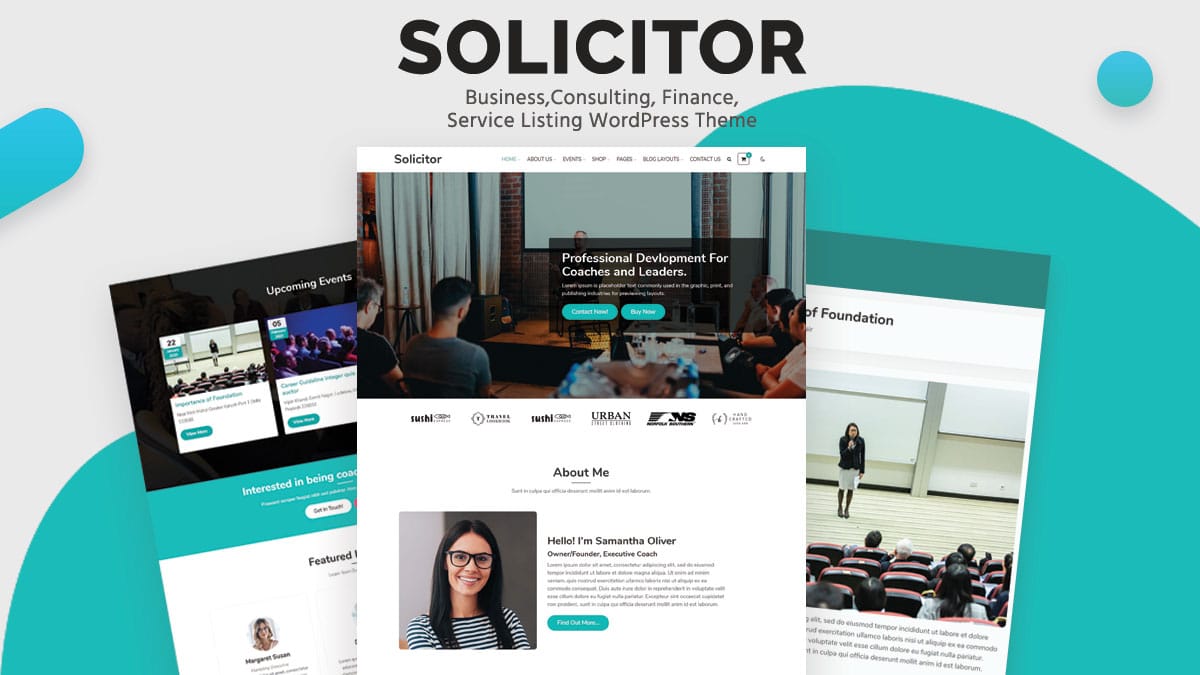
A business website has one job most other site types don’t: convince a stranger to trust a company they’ve never heard of within the first few seconds on the page. Design does real work here, not decoration, and the theme underneath either supports that trust-building or quietly undermines it with slow load times and generic layouts.
The 20 themes below split into three groups: community-driven business platforms, fast general-purpose themes that work for nearly any industry, and premium creative themes built for agencies and design-forward brands.
What Actually Builds Trust in a Business Theme
Load speed affects credibility more directly than most business owners realize. A slow site reads as an unmaintained one, and visitors form that impression within the first couple of seconds, long before they’ve read a word of copy.
Clear service and team pages matter more for a B2B or professional services business than flashy animation. A prospect researching a vendor wants to know who they’re dealing with and what exactly gets delivered, not be impressed by a parallax scroll effect.
Lead capture has to be built in or easy to add, whether that’s a contact form, a booking calendar, or a quote request. A beautiful site that makes it hard to actually get in touch is a beautiful site that isn’t doing its job.
20 Best WordPress Business Themes for 2026
1. Reign Theme – Best for Customer Communities
Reign Theme takes an unusual angle for a business site: building an actual customer or partner community around the brand rather than a one-way brochure. A B2B network, a customer forum, or a partner portal all become viable with the BuddyPress integration underneath.
For a business whose real differentiator is its customer relationships rather than its product photos, this is worth serious consideration over a standard corporate template.
Member profiles and activity feeds generate a steady stream of fresh, keyword-varied content without a marketing team writing every word, which is a genuine secondary SEO benefit most business themes can’t offer at all.
2. BuddyX Pro – Best for Professional Networking
BuddyX Pro leans into a more modern, lighter aesthetic for the same community-driven business model, suited to a B2B platform trying to look contemporary rather than corporate-stiff.
The theme pairs global styles with community templates, so a rebrand or visual refresh propagates through member profiles and group pages automatically rather than requiring a manual pass through a dozen separate templates.
3. Astra – Best All-Around Business Theme
Astra ships hundreds of starter templates spanning nearly every industry, staying under 50KB at its core while doing it. That combination of choice and speed is why it remains the default recommendation for a general business site.
Because it works cleanly with every major SEO plugin and page builder, an agency can standardize on Astra across many different client projects without hitting compatibility surprises from project to project.
4. GeneratePress – Best for Performance-First Builds
GeneratePress pairs with GenerateBlocks for developers who want full layout control without the weight a typical business theme demo carries.
GenerateBlocks only loads CSS for the specific blocks used on a given page, which keeps even a content-heavy business site loading fast as it grows past a handful of pages.
5. Kadence – Best Block-First Business Theme
Kadence was built around the block editor from day one, and its business-focused starter templates come with sensible heading structure already in place rather than needing a rebuild.
Its own block extensions cover advanced forms and info-box layouts natively, which cuts down the number of separate plugins a business site would otherwise need just to build a proper services page.
6. Blocksy – Best for Visual Header Customization
Blocksy‘s visual header and footer builder makes structural branding changes accessible without touching a template file, useful for a business that wants control without hiring a developer for every tweak.
Dynamic content options pull post meta directly into custom layouts, useful for surfacing things like a service’s price or a location’s hours without a separate custom fields plugin.
7. OceanWP – Best Free Option With Builder Flexibility
OceanWP works with every major page builder and stays free at its core, a common choice for agencies handling many small business client sites on a budget.
Its extension system means additional business-specific features only get added when a project actually needs them, keeping the core theme light for the many client sites that never touch half of what a heavier premium theme ships by default.
8. Neve – Best for Mobile-First Service Businesses
Neve stays feather-light, which matters directly for a local service business where most searches happen on a phone standing in a parking lot or a kitchen.
AMP compatibility carries through to business pages too, shaving extra load time off exactly the kind of urgent, on-the-go search that turns into a phone call within minutes.
9. Sydney – Best for Local and Small Business
Sydney targets small business and local service sites specifically, with layout options built around trust signals like testimonials and team sections that support local SEO schema well.
Contact and location blocks map cleanly onto LocalBusiness schema fields, saving a round of manual markup work most small business owners never get around to handling on their own.
10. Zakra – Best for Fast Multi-Industry Launch
Zakra ships a large library of niche-specific starter sites, letting a freelancer or agency launch a new business site quickly without starting from a blank page.
The demo import strips unused CSS for whichever niche starter is selected, so the finished site isn’t carrying dead code from the dozens of other industry templates that never got used.
11. Ollie – Best Pure Full Site Editing Theme
Ollie is a genuine full site editing block theme with a pattern library aimed squarely at marketing and business content, built entirely on WordPress core’s own rendering.
Because it leans on core’s rendering rather than a custom framework, it tends to stay compatible longer as WordPress itself evolves its full site editing tooling.
12. Twenty Twenty-Five – Best Free Default Option
Twenty Twenty-Five is WordPress’s own current default theme, held to core’s own accessibility and markup standards, and a legitimately solid baseline for a simple business site.
Its included style variations offer a handful of distinct looks without leaving the default color and font choices, useful for a business that wants some visual identity without designing one from scratch.
13. Divi – Best Visual Builder for Non-Developers
Divi gives a business owner full drag-and-drop design control, and recent versions have addressed the performance criticism older releases earned with a rebuilt, lighter front-end framework.
Dynamic CSS loading now only pulls in what a given page actually uses, which meaningfully closes the speed gap that used to separate Divi from leaner competitors on this list.
14. Avada – Best for Massive Template Selection
Avada remains one of ThemeForest’s best-selling themes for a reason: an enormous library of pre-built demos covering nearly any business type imaginable. The tradeoff is real, though: unused features add page weight that needs active pruning to keep load times reasonable.
A site owner picking Avada specifically for its demo variety should plan on disabling unused Fusion Builder elements after launch, rather than leaving every feature active by default and wondering later why the site feels sluggish.
15. Hello Elementor – Best Bare-Bones Elementor Base
Hello Elementor strips out nearly everything, leaving almost no CSS or JavaScript for Elementor itself to override, ideal for a business already committed to building entirely in that page builder.
On its own it’s about as close to a blank canvas as WordPress themes get, which avoids the double-loading problem of a heavy theme underneath an already heavy page builder.
16. Ashe – Best Lightweight Minimalist Option
Ashe stays close to WordPress core defaults with just enough styling refinement to feel distinct, suited to a consulting or professional services business where restraint reads as credibility.
Typography carries most of the design weight in Ashe’s default look, which works well for a services business built on written expertise but needs more customization for a heavily visual, image-driven brand.
17. Uncode – Best for Design-Forward Agencies
Uncode has sold well over 130,000 licenses on ThemeForest, built around a tailored, enhanced version of WPBakery Page Builder aimed at creative agencies and freelancers, plus portfolio-driven businesses, that want pixel-level design control.
The tradeoff for that visual polish is a steeper learning curve than a typical business theme, which suits an agency with design resources on staff more than a solo business owner managing the site alone.
18. The7 – Best for Multi-Purpose Business Builds
The7 by Dream-Theme covers business sites, agency sites, landing pages, and online stores from one theme, with compatibility across Elementor, the block editor, and WPBakery depending on which workflow a team already knows.
That builder flexibility means a design team switching page builders mid-project, or an agency inheriting a client site built in an unfamiliar tool, isn’t forced into a full rebuild just to keep working in a preferred workflow.
19. Bridge – Best Established Multipurpose Theme
Bridge has held a top-ten spot on ThemeForest since its 2014 release and sold nearly 200,000 licenses, which means an unusually deep well of documentation and tutorials, plus third-party support, for nearly any customization question that comes up.
That longevity also means Bridge has been battle-tested against more real-world plugin conflicts than a newer theme, which reduces the odds of hitting an obscure, undocumented compatibility issue mid-build.
20. Themify Ultra – Best Bundled Layout Library
Themify Ultra includes an extensive library of business layouts with drag-and-drop customization, part of a broader theme and plugin bundle that covers more than just this one product.
For a business owner who wants one purchase to cover the theme and its supporting plugins together, rather than assembling a stack from several different vendors, that bundled pricing is the practical draw here over a standalone theme.
Comparison at a Glance
| Theme | Best For | Type | Price |
|---|---|---|---|
| Reign Theme | Customer communities | Community + business | $69/year |
| BuddyX Pro | Professional networks | Community + business | $69/year |
| Astra | All-around use | Hybrid, lightweight | Free / $59+ |
| GeneratePress | Performance builds | Hybrid, lightweight | Free / $59+ |
| Divi | Visual design control | Page builder theme | $89/year |
| Avada | Template variety | Premium multipurpose | ~$69 |
| Uncode | Design-forward agencies | Premium creative | ~$59 |
| Bridge | Established support base | Premium multipurpose | ~$59 |
Common Mistakes That Undercut Trust
Stock photography that’s obviously stock photography is a quiet credibility killer. Visitors have seen the same handshake and laptop images across a hundred other sites, and real photos of the actual team or workspace, even imperfect ones, read as more trustworthy than a polished but generic library shot.
A missing or vague about page costs more trust than most businesses realize. A prospect wants to know who’s actually behind the company before handing over payment details or signing a contract, and a page that dodges that basic question reads as evasive rather than mysterious.
Contact information buried three clicks deep is a specific, fixable mistake. A phone number and email address, plus a physical address where that’s relevant, should be reachable from any page on the site, not just a dedicated contact page nobody thinks to look for until they’re already frustrated.
Choosing by Business Type
A local service business, a plumber, a law office, a dental practice, gets the most direct value from Sydney or Neve, both built around the trust signals and mobile speed that local search traffic depends on.
A B2B company selling to other businesses benefits most from Reign or BuddyX Pro if a community or partner network is part of the growth strategy, or from a fast general theme like Astra or GeneratePress if the site’s job is simply informing and converting leads.
A creative agency or design studio should look at Uncode, The7, or Bridge specifically, since these premium multipurpose themes give the visual flexibility a portfolio-heavy site actually needs, at the cost of more setup time than a lightweight general theme.
Testing a Theme Before Committing the Business to It
Install a shortlist on a staging site with real business content, not the demo placeholder text, before making a final call. A theme’s own demo always looks better than a first pass at your actual copy and photos, and the only way to know if a layout genuinely works is to load in the real thing.
Run the staging homepage and a representative service or product page through PageSpeed Insights before customizing anything further. That gives a clean baseline instead of a number muddied by whatever plugins get added on top later.
Check the site on an actual phone, not just a resized browser window. Business decision-makers researching a vendor increasingly do that research on mobile during a commute or between meetings, and a layout that looks fine in desktop preview can fall apart under a thumb on a six-inch screen.
Common Questions
Is a free theme like Astra or OceanWP good enough for a real business site?
Yes, for most small to mid-sized businesses. Both handle standard business functionality reliably at zero cost. The gap shows up in advanced template variety and built-in design flourishes, which premium multipurpose themes like Avada or Uncode include natively.
How much does theme choice actually affect conversion rates?
Less than copy and offer clarity, but more than most business owners assume. A slow, confusing layout adds friction at every step of a buyer’s decision, and fixing that friction is often cheaper than the marketing spend it takes to overcome it.
Should a growing business plan to outgrow its first theme?
Sometimes, but it’s not automatic. A lightweight, well-built theme like Astra or GeneratePress scales fine from a five-page site to a much larger one without a rebuild. A heavily templated theme chosen purely for its initial demo library is more likely to need replacing once the business’s actual needs diverge from that original template.
Does a business need a premium theme, or is free enough to start?
Free is genuinely enough for most businesses at launch. Astra and GeneratePress both offer strong free tiers that outperform many paid themes on Core Web Vitals, and OceanWP holds that same line. Paid upgrades usually buy design flexibility and template variety, not fundamentally better SEO or speed.
How often should a business revisit its theme choice?
Roughly every two to three years is a reasonable check-in point, or sooner if a major WordPress core update introduces new capabilities the current theme doesn’t support well. A theme that hasn’t been updated in over a year is worth re-evaluating even if nothing looks obviously broken yet.
The right pick depends on what the business actually needs to communicate: community and relationships, raw speed and simplicity, or design-forward credibility. Match the theme to that need specifically, not to whichever demo site looked most impressive during a five-minute browse.
Whichever theme wins, the decision is rarely permanent. WordPress makes switching themes later a manageable project rather than a full site rebuild, so treating this as the final, unchangeable choice adds pressure the decision doesn’t actually deserve. Pick the option that fits today’s real needs, and revisit it once the business has genuinely outgrown it.